Most reviews of Synthesizer V Studio 2 do one of two things: they gush like a vocaloid fan who finally heard a synthetic voice that doesn’t sound robotic, or they rewrite Dreamtonics’ feature list with the marketing adjectives left in. Neither answers the only question a working producer actually has. You don’t care whether an AI voice is “impressive.” You care whether it’s good enough to put on a record you release — and what the catch is.
So here is the honest version up front. The raw vocal in Studio 2 is genuinely release-usable for the right job. The timbre realism is the real headline upgrade, the rendering is fast enough to stop breaking your flow, and you can make a voice sing in a language the singer never recorded. But “AI singer” still does not mean “type lyrics, get a star.” It means you do the comping, phrasing, and tuning a producer does anyway — just on a synthesized performance instead of a tracked one. And the price tag everyone quotes, $99, is the floor, not the cost. The two things nobody leads with are that voices are a real, recurring expense and that the rights story has a credit-and-disclosure wrinkle even though the licensing itself is handled. This review is about those gaps, because they are what decide whether this tool fits your workflow or wastes your weekend.
How we approached this. We re-verified every price, tier, version, feature, and licensing line against Dreamtonics’ live store and product pages this session, plus current third-party reviews and the active user community — not older write-ups, several of which already mis-state the v2 toolkit. This is a reasoning-and-documentation review, not a first-party listening test: we did not run a controlled blind A/B in our own room, so every judgement about how the voice sounds is framed as reasoning from documented behaviour and the consensus of producers who use it daily — never a fabricated “it sounded like” claim. Where a number could move, we tell you to confirm it on the live page. Let’s get into it.
Synthesizer V Studio 2 Pro is the most directable, release-grade AI vocal a producer can run as a real plugin inside their DAW — class-leading timbre realism, deep note-by-note control, 300% faster rendering, and cross-lingual singing. Buy it if you write your own songs and need a singer you can direct — a lead, backing vocals, a guide track, or a vocal in a language you don’t speak — and you’re willing to do a phrasing-and-tuning pass. Skip it if you want to type lyrics and get a finished song; that’s a generator like Suno, a different category entirely. Budget for the real cost — $99 buys the editor and one voice, and the voice you actually want is usually an extra purchase. Used as a directed instrument, it’s excellent. Mistaken for a one-click hit machine, it will disappoint you.
The Verdict
The most realistic, most controllable AI singer you can run natively in a DAW — release-usable for the right job, as long as you treat it as an instrument you direct, not a button you press.
| Raw vocal naturalness (out of the box) | 9.1 | |
| Control depth (phoneme timing / vocal modes) | 9.0 | |
| Effort to a release-believable take | 7.8 | |
| Render speed & workflow | 8.7 | |
| Cross-lingual & language range | 8.6 | |
| Value (base price vs true cost to ship) | 8.0 | |
| Who-it’s-for clarity | 8.5 |
That overall is a defended judgement, not an average, and the spread is the whole story. Raw naturalness (9.1) and control depth (9.0) are where Studio 2 leads the category outright: the timbre is the best a directable synth has produced, and nothing else gives you this much manual say over phoneme timing and vocal character. Render speed (8.7) and cross-lingual range (8.6) are genuine strengths — the 300% speed-up changes how you work, and six native languages plus cross-lingual singing is rare. Value (8.0) is good but honest: $99 is a low entry, you own it perpetually, and then the voices add up. The number that pulls the overall down to 8.5 is the one that matters most for your expectations — effort to a release-believable take (7.8). The voice is realistic, but getting a take that survives a discerning A&R ear still costs you a producer’s phrasing-and-tuning pass. That gap between “sounds great in a demo” and “ships on a single” is the truth the hobby reviews skip, and every number above is defended below.
What Synthesizer V Studio 2 Actually Is
Before anything else, get the category right, because it’s the single most common mistake people make when they land on this tool. Synthesizer V Studio 2 is a directable singing-voice synthesizer. You write the song — you enter notes and lyrics in a piano-roll, choose a voice, shape the expression — and it sings your melody back to you. It is the digital equivalent of hiring a session singer who will sing exactly the part you put in front of them, in the key, rhythm, and phrasing you specify. It is not a generator. You are not typing “sad pop ballad about leaving home” and getting a finished track. If that’s what you want, you want Suno, and you’re reading the wrong review.
That distinction is not pedantry; it’s the entire buying decision. A whole-track generator answers the question “I have an idea and no song” — it writes melody, harmony, arrangement, and lyrics for you and hands back audio you mostly take or leave. A vocal synthesizer answers a completely different question: “I have a song and no singer.” You already wrote the topline. You need a voice to perform it, and you need to direct that performance the way you’d direct a human in the booth. Producers who write their own material and just can’t sing — or can’t sing in the register, gender, or language the song needs — are the exact audience. So is anyone who needs a convincing guide vocal to send a real singer, or demo vocals to pitch a song before a session is booked.
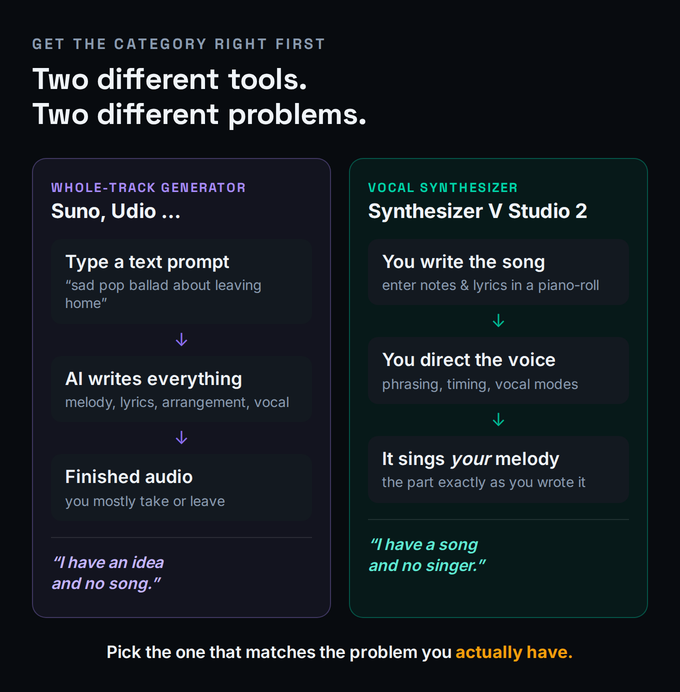
Mechanically, Studio 2 works with real vocals — voices recorded and licensed from real human singers, then modelled with AI so you can synthesize new performances from them. You pick a voice database (a specific singer), draw a melody, type the lyrics, and the software renders it. From there the work begins: adjusting pitch curves, vibrato, dynamics, phoneme timing, and the vocal “mode” (think chest, belt, breathy) until the performance reads as intentional rather than mechanical. It runs as a true plugin — VST3, AU, AAX, and standalone on macOS and Windows — which, as we’ll see, is a bigger deal than it sounds when you compare it to the competition.
The Honest Question: Is the Vocal Good Enough to Release?
Yes — for the right job, and with the right expectations. The raw timbre in Studio 2 is the most realistic a controllable synth has produced, and the community of producers actually shipping with it backs that up: people are releasing tracks with these vocals, not just making tech-demo videos. The marketing phrase is “human-level naturalness,” and while we treat any blind-test claim as reported, not measured, the documented improvements are real — the v2 models more accurately reproduce human voice dynamics, preserving fine detail and presence without sacrificing pitch or pronunciation accuracy. On a sustained, mid-register pop or R&B line, lightly processed, the gap to a real singer has narrowed to the point where a casual listener won’t flag it.
Now the honest qualifier, because “good enough to release” is doing a lot of work in that sentence. “Good enough” describes the ceiling the tool can reach, not the floor you get for free. The default render — notes in, lyrics typed, voice selected, hit play — is a strong demo, not a finished lead. The distance between that demo and a believable take is exactly the distance a producer covers on a human vocal: comping the best phrases, fixing the timing that lands a hair early or late, taming a consonant that pokes out, shaping the dynamics so the performance breathes. The difference is that here you’re doing it with editing tools instead of punch-ins, and the tools are deep. The voice gives you a far better starting point than v1 ever did; it does not give you a finished performance. Budget for the pass, and the result can absolutely ship. Skip the pass and expect a record, and you’ll hear the seams.
Where it genuinely struggles is the same place every vocal synth struggles: anything that lives at the edge of the voice. Fast, percussive, consonant-heavy rap delivery; screamed or heavily distorted rock and metal vocals; extreme runs and melisma that depend on micro-timing a human improvises. The available voices also skew toward clean pop, soul, and R&B timbres, so a gritty rock lead or a true belter is harder to source — though the third-party voice ecosystem (a gritty English rock tenor like Eclipse Sounds’ HXVOC, for instance) is starting to fill those gaps. Match the voice and the part to the tool’s strengths and it’s remarkable. Push it into territory it wasn’t built for and you’ll spend more time fighting it than a real take would have cost.
What’s New in Studio 2
Studio 2 is a real generational jump from the original Synthesizer V, not a point update, and the headline number is the one you feel first: up to 300% faster rendering on a modern machine, achieved through better model design and multi-threading, with no dedicated GPU required and full offline use. That speed is not a vanity metric. The thing that kills momentum on a vocal synth is the wait between an edit and hearing it; cut that wait by two-thirds and you actually iterate on phrasing instead of avoiding it. Combined with Live Rendering, which visualises your edits as a waveform in real time, the workflow stops feeling like batch processing and starts feeling like directing.
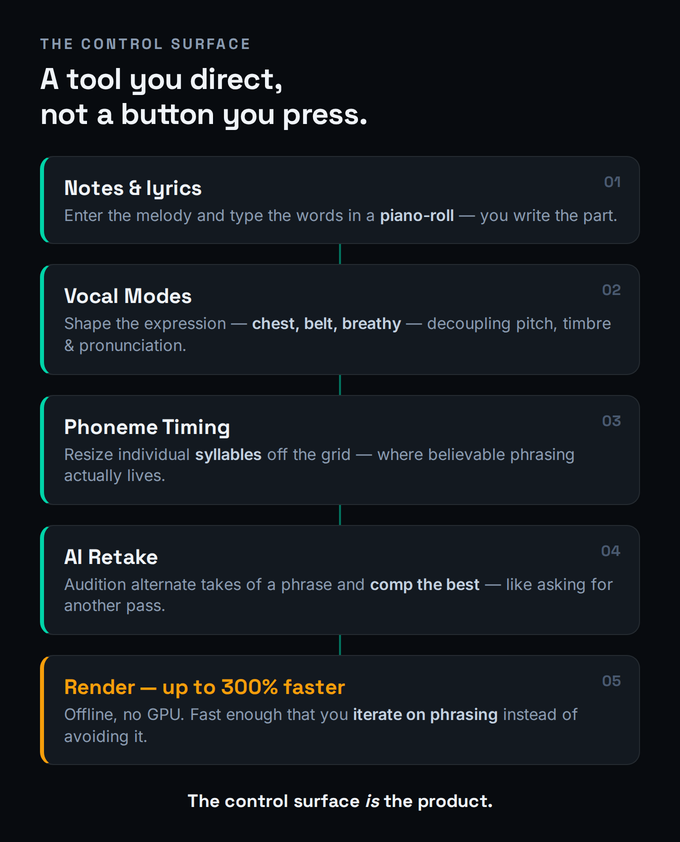
The feature set that matters to a producer comes down to four tools. AI Retake regenerates alternate takes of a phrase, so instead of one fixed output you audition variations and comp the best — the closest thing to asking a singer for another pass. The Phoneme Timing panel lets you directly resize and adjust the timing and intensity of individual syllables within a note, which is where believable phrasing actually lives; it’s the difference between syllables that land mechanically on the grid and ones that breathe. The redesigned Vocal Modes decouple aspects of the performance — pitch, timbre, and pronunciation can be shaped more independently, and each voice’s modes were re-worked to be more stylistically distinct. And Smart Pitch plus the deep pitch-curve editing give you the same control over intonation and vibrato you’d expect from a serious vocal-tuning workflow.
The most quietly important feature is one most reviews under-sell: cross-lingual synthesis. Voices are native in six languages — English, Japanese, Mandarin Chinese, Cantonese Chinese, Korean, and Spanish — and cross-lingual synthesis lets any voice sing in any of those six, regardless of the language it was recorded in. For a songwriter who wants a Spanish-language hook but works in English, or who needs a voice that simply isn’t available in their language, that’s a capability no session singer offers off the shelf. The v2.2 update added Choir Voice Collections and a Unison section that builds an ensemble of up to sixteen voices within one track (with stereo spacing control), plus MusicXML import and a render cache that speeds up project loading. A v2.3 technical preview, a closed beta opened on May 22, 2026, is testing experimental cross-lingual French, German, and Brazilian Portuguese — promising, but explicitly a preview, with the phoneme set still being refined and no guarantee of compatibility with the final release. We’re reviewing the shipping v2.2 line; treat the new languages as “coming, not arrived.”
Where It Genuinely Shines
Four things stand out, and they cluster around one idea: this is the tool for a producer who wants control, not convenience. First, raw timbre realism — on a clean, sustained line in the pop/soul/R&B wheelhouse, the voice quality is the best in the directable-synth category, and it’s the upgrade you notice in the first ten seconds. Second, singing in languages you don’t speak: cross-lingual synthesis turns a single voice into a multilingual session singer, which is genuinely hard to get any other way. Third, fast demo and guide vocals: when you need to hear your topline sung, or hand a convincing reference to a real vocalist, Studio 2 produces that in minutes, and the 300% render keeps it from interrupting your session.
Fourth, and most decisive for a serious workflow, is the control surface itself — and here’s where the “true plugin” detail pays off. Synthesizer V runs as an actual plugin inside your DAW; it opens the editor right there in Reaper, FL Studio, Ableton, or Logic and renders in place. Its main rival, ACE Studio, integrates through a “bridge” plugin and ARA rather than running natively, which the community consistently flags as the more awkward path. If you want your AI vocalist to live inside your session rather than in a separate app you bounce audio out of, Synthesizer V is the one that behaves like a real instrument. For producers who care about staying in-the-box and iterating tightly, that integration plus the depth of manual editing is the whole reason to pick this over anything else — and the reason its users describe its realism and tweakability as “unmatched” once they’ve learned it.
Where the Hand-Work Still Lives
Now the part the enthusiast reviews gloss over, because it’s the part that decides whether you’re happy with what you ship. A believable AI vocal is not the default output; it’s the result of a deliberate editing pass, and you need to know what that pass involves before you decide the $99 is “cheap.” The cost of this tool is partly measured in your time.
The first and biggest job is phrasing and timing. The default render places syllables accurately on the grid, but accurate is not the same as human — real singers push and pull against the beat, anticipate some words, lean late on others, and that micro-timing is what reads as “a person sang this.” The Phoneme Timing panel is the tool for it, and it’s powerful, but it’s manual: you’re sculpting the performance syllable by syllable on the lines that matter. The second job is breath and consonant realism — getting consonants to sit naturally, adding or shaping breaths, smoothing the transitions that can sound synthetic when left raw. The third is the “un-canny” pass: the subtle dynamic shaping, vibrato variation, and the occasional AI Retake to replace a phrase that lands in the uncanny valley, where it’s almost-but-not-quite right in a way a listener feels even if they can’t name it.
None of this is a knock on the tool — it’s the same work you’d do making any vocal sound professional: comping, tuning, and shaping the take, and the editing tools here are deep enough to do it well. The skills transfer directly from a real-vocal workflow — the pitch-and-timing craft in our guide to using Auto-Tune and the Auto-Tune vs Melodyne comparison apply just as well to a synthesized line, and a finishing vocal chain sits it in the mix exactly as it would a tracked vocal. The point is honesty about the workflow: the realism is reachable, but you reach it. Producers who treat the synth like a real singer they’re directing — trusting it on the lines it nails, intervening on the ones it doesn’t — get the best results with the least frustration. Producers who expect a finished vocal from a default render get a good demo and conclude the tool is “overhyped.” Both are describing the same software; the difference is entirely in the expectation. One more workflow note worth your time: there’s a learning curve, and the community wisdom is to judge the tool by what experienced users get out of it, not by Dreamtonics’ own demo videos, which are widely considered to undersell it.
The True Cost: Base Price vs the Voice You’ll Actually Use
Here’s the math nobody puts up front. Synthesizer V Studio 2 Pro is $99, a one-time perpetual license — no subscription, you own it, and you get free updates within the major version. That price includes one complimentary voice, chosen from a small starter set (currently Liam, an English male pop/rock voice; Mo Xu, a Mandarin female R&B/soul/pop voice; or Mai 2, a Japanese female voice). There’s also a 14-day free trial with all core features, so you can test the actual workflow before paying. So far, so reasonable — cheaper than a year of its subscription rival.
But read the fine print on the product page and it tells you the real story: this product requires voice databases to function, and it ships with one. The voice you get for free may not be the voice your song needs — a male English pop voice doesn’t help if you’re writing a female R&B hook, and vice versa. So the practical entry point for most producers is the Pro + One Additional Voice bundle, around $149, which lets you choose a second voice. From there, voices are sold individually, and they’re where the budget actually goes: each additional database is a separate purchase, premium third-party and specialty voices can run higher, and dedicated content like the Choir Voice Collections is its own tier again (the complete choir bundle was introduced around $299, with a higher regular price). Upgrading older v1 voices to v2 is a separate cost too, starting around $19 each. None of this is hidden — but it means the honest cost of getting your sound is “base + the voice you’ll actually use,” not the $99 headline. Confirm current voice pricing on the live store, because the catalog and bundles change.
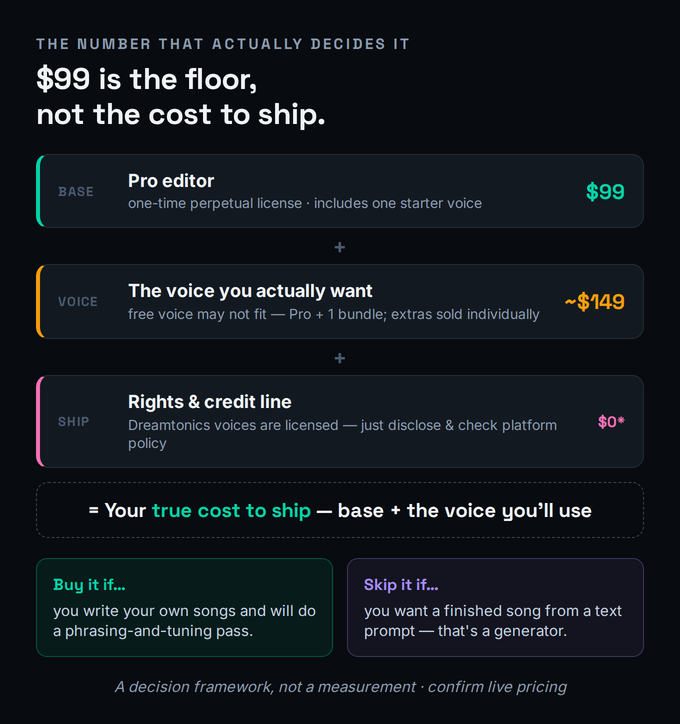
The value verdict, then, is genuinely strong but conditional. Against the alternative — a subscription you rent forever — owning the editor and your voices outright is a real advantage; nothing gets deprecated out from under you or re-priced into a tier you didn’t want. Against the headline expectation, $99 is the cost of admission, not the cost of the show. If you only ever need one or two voices and you’ll use them for years, the total cost of ownership is excellent. If you want a deep, rotating library of timbres for different projects, the per-voice model adds up faster than a subscription that bundles dozens — which is exactly the trade-off the next section is about.
The Rights & Credit Line Before You Release
This is the section hobby reviews skip entirely, and it’s also the one where the most common scary claim is actually wrong, so let’s be precise. The good news first: Dreamtonics’ own voices ship with a commercial-use license. The company states plainly that songs created with its official voices can be released, distributed, and monetized with no restriction on monetization — the singers were recorded and licensed for exactly this. So the fear that you have to “clear the rights” to the singing itself, on a Dreamtonics voice, is misplaced. The licensing for the performance is handled when you buy the voice. That’s a meaningful advantage over the legal cloud hanging over scrape-trained whole-track generators.
The wrinkles that remain are real but narrower than the panic suggests. First, third-party and partner voices have their own license terms — the ecosystem includes voices from other developers (and partner voices like SOLARIA or ASTERIAN sold separately), and you should read each one’s terms rather than assume the Dreamtonics grant covers it. Second, disclosure and credit are about platform policy and good practice, not Dreamtonics’ license: streaming services and some sync/library contexts increasingly expect or require disclosure of AI-generated vocals, and crediting the voice and the tool is becoming an honesty norm in the same way crediting a sample or a session player is. Third, the broader legal landscape around AI voices — voice cloning, name-and-likeness, and the copyrightability of AI-assisted work — is still moving, and while none of it blocks releasing a Synthesizer V vocal today, it’s worth understanding before you build a catalog on it. For the full picture, read our guides on whether AI voice cloning is legal and whether you can copyright AI music, and the wider is AI music legal overview. This is general information, not legal advice; confirm the current terms for your specific voice and your distribution platform.
Synthesizer V vs ACE Studio vs a Generator (Suno)
The buyer’s fork has three prongs, and naming them correctly is most of the decision. The first fork is the big one: directed vocal synthesis versus whole-track generation. If your problem is “I wrote a song and need a singer,” you want a vocal synth — Synthesizer V or ACE Studio. If your problem is “I want a finished track from an idea,” you want a generator like Suno, and you should read our guide to Suno and the best AI music generators of 2026 instead. These are not competitors; they answer different questions. Confusing them is the number-one reason people buy the wrong tool.
The second fork is the real head-to-head: Synthesizer V versus ACE Studio, the two serious directable AI vocal synths. They split along two clean lines. On ownership: Synthesizer V is a one-time purchase — you buy the editor and individual voices and keep them. ACE Studio is subscription-first, starting around $149/year, though it has added rent-to-own (the license becomes perpetual after two years of continuous subscription) and, more recently, an outright buy option. On library versus depth: ACE Studio’s pitch is breadth — a large rotating library of 140-plus blendable, royalty-free voices, voice cloning to train your own, voice-blending, even AI instruments, all included in the subscription. Synthesizer V’s pitch is depth — fewer voices, bought individually, but the deepest manual phoneme and expression control and, by community consensus, the most realistic and tweakable results once you’ve learned it.
The tie-breaker for a lot of producers is DAW integration, and it cuts in Synthesizer V’s favour: it runs as a true plugin inside the DAW, while ACE Studio integrates through a bridge plugin and ARA rather than running natively. So the honest recommendation is workflow-shaped: choose ACE Studio if you want the biggest voice library, voice cloning, and an all-in-one vocal environment, and you don’t mind a subscription and a bridge. Choose Synthesizer V if you want to own your tools, you value the deepest manual control and the most realistic raw timbre, and you want your AI singer to behave like a real plugin in your session. For producers who write their own songs and finish in a DAW, that last point is usually decisive.
Who Should Buy It, Who Should Skip It
Buy Synthesizer V Studio 2 if you write your own songs and need a singer you can direct — a lead vocal, backing vocals, harmonies, or a choir — and you accept that you’ll do a phrasing-and-tuning pass to get a release-grade take. Buy it if you need convincing demo or guide vocals to pitch songs or to brief a real vocalist. Buy it if you want to sing in a language you don’t speak, where cross-lingual synthesis is close to a superpower. And buy it if you specifically want to own your tools rather than rent them, and want your AI vocal to live inside your DAW as a real plugin.
Skip it — or rather, buy something else — if you want to type lyrics and get a finished song; that’s a generator, full stop, and no amount of learning Synthesizer V will turn it into one. Skip it if you need a one-click result with zero editing, because the realism lives in the editing and there’s no shortcut around the pass. Skip it if you’re unwilling to budget beyond $99 for the voice you actually want, since the free voice may not fit your song. And weigh it carefully if your music lives at the edges of the voice — aggressive rap, screamed rock or metal, extreme melisma — where the tool and the available voices are weakest. The honest test is the one we opened with: if you have a song and need a singer, this is the best directable option on the market. If you have an idea and need a song, you’re shopping in the wrong aisle.
Try It Yourself (Free Trial)
The fastest way to know whether this tool fits your workflow is to run the 14-day free trial and put it through the three jobs below, in order. They move from “does the default impress me” to “can I get a release-grade take,” which is the question that actually matters. If you don’t own a pitch or chain plugin yet, our free pitch-correction reference and vocal-chain builder are handy alongside the trial.
- Install the free trial, open it standalone or as a plugin in your DAW, and load the included voice.
- Enter a simple four-bar melody you already know in the piano-roll and type the lyrics, one syllable per note.
- Hit render and listen to the raw, un-edited output. Note your honest first reaction — this is the floor, not the ceiling.
- Take that same phrase and open the Phoneme Timing panel; nudge two or three syllables slightly off the grid to add human push-and-pull.
- Shape the dynamics and vibrato so the line breathes, and use AI Retake on the one phrase that sounds most mechanical.
- A/B the edited take against the raw render. The distance you just covered is the producer’s pass — and the real cost of the tool.
- Take a hook and have the voice sing it in a second language using cross-lingual synthesis; judge the pronunciation honestly.
- Automate a Vocal Mode (chest to breathy, for example) across a phrase to shape the emotional arc of the line.
- Bounce the result and drop it into a real mix. Ask the only question that counts: would this survive on a record you’d release?
The Verdict
Synthesizer V Studio 2 is the best directable AI singer a producer can buy in 2026 — the most realistic raw timbre in its category, the deepest manual control, fast enough rendering to keep you in flow, cross-lingual range that no session singer offers off the shelf, and the rare distinction of running as a real plugin inside your DAW. At an 8.5, it earns a clear recommendation for the producer it’s built for. The half-point that keeps it from higher is the half-point of honesty: the voice is release-usable, but the release-grade take is something you produce, not something you’re handed, and the true cost is base plus the voice you’ll actually use. Go in expecting an instrument you direct, and it’s excellent. Go in expecting a star in a box, and you’ll be the one writing the “overhyped” review.