Every other review of ElevenLabs Music tells you the same two things: the vocals are great, and it’s the “safe” one because it’s trained on licensed data. Both are true. Neither is the thing that should actually decide it for you. Because the headline ElevenLabs prints on every page — every track you generate is cleared for commercial use — is doing a lot of quiet work, and the moment you read the plan you’re actually on, that sentence sprouts asterisks that bite exactly the producers most likely to need it.
Here is the part the SERP keeps missing. On a paid self-serve plan, your track is cleared for YouTube, podcasts, social, advertising, and most gaming — but not film, not TV, and not Studio Games, which require an Enterprise plan. Tracks tied to ElevenLabs’ Music Marketplace can’t be distributed to Spotify, Apple Music, or SoundCloud at all, under any license. And because a purely AI-generated track may not be copyrightable in the first place, “cleared to use” is not the same promise as “you own this and can release it like a normal record.” None of that makes ElevenLabs a bad tool. It makes it a tool you have to read the manual on before you build a business on top of it — which is exactly what this review is for.
How we approached this. We re-verified every feature, format, and licensing line against ElevenLabs’ live product, docs, and terms pages this session — not older reviews, several of which are already stale on the v2 toolkit. We read the actual Music Terms and Model-Specific Terms rather than restating marketing, we separated “training was licensed” from “your release is covered,” and we placed the tool against where Suno and Udio genuinely stand in June 2026. Where output quality needs first-party audio measurement we haven’t finished, we say so plainly rather than fake a chart. Let’s get into it.
ElevenLabs Music v2 is the most rights-clean and genuinely usable AI music platform for everyday commercial content — strong vocals, excellent multilingual output, and a real v2 editing toolkit (inpainting, section-by-section composition, stem separation). For a creator or brand making YouTube, ad, podcast, or social content, it’s arguably the rational default in 2026. For a producer who wants to finish in a DAW or release on streaming, weigh three real limits first: no MIDI export, a 44.1kHz ceiling (Udio does 48kHz), and a licensing story that bars film/TV/studio-game use on self-serve and bars Marketplace tracks from streaming entirely. Used as a clean source of commercial audio, it’s excellent. Used as a release pipeline, read every line first.
The Verdict
The cleanest licensed-training story in AI music, attached to a real v2 toolkit — held back from greatness by export gaps and a commercial-use asterisk that bites releasing producers.
| Output quality | 7.4 | |
| Vocal realism & languages | 7.8 | |
| Production toolkit (inpainting, sections, stems) | 8.0 | |
| DAW handoff (export, stems, MIDI) | 6.3 | |
| Licensing & training cleanliness | 8.2 | |
| Commercial-use flexibility (the plan asterisks) | 5.6 | |
| Value | 6.8 |
That overall is a defended judgement, not an average, and the spread is the story. Production toolkit (8.0) and licensing cleanliness (8.2) are where v2 genuinely leads: real inpainting, section-by-section composition, stem separation, and the only mainstream training story with no major-label lawsuit attached. Vocals (7.8) ride ElevenLabs’ voice heritage and are excellent across languages, though Suno still edges it on raw English expressiveness. Output quality (7.4) is very good but not category-best, and capped by a 44.1kHz ceiling. Then the two numbers that pull it back to a 7.0: DAW handoff (6.3), because there’s no MIDI and stems come through a separate separation step, and commercial-use flexibility (5.6), because the “cleared for commercial use” headline excludes film, TV, and studio games on self-serve and won’t let Marketplace tracks reach streaming. Value (6.8) sits in the middle: cheaper after the v2 price cut, but the formats and uses you may want most are gated upward. Every one of those numbers is defended below.
What ElevenLabs Music v2 Actually Is
ElevenLabs Music is a text-to-song generator from the company best known for AI voice. You describe a track — genre, mood, tempo, instrumentation, vocal style, lyrics — and it returns a full song with vocals and arrangement, in any of dozens of languages. The lineage matters for the verdict: the first Eleven Music model launched in August 2025, the free ElevenMusic iOS app arrived in April 2026, and Music v2 — the current model and the subject of this review — launched on May 26, 2026 as a substantial upgrade to vocals, arrangement, and, crucially, control.
One model, three front doors, and the split tells you who ElevenLabs is really chasing. ElevenMusic is the consumer studio — the app and web interface where individual creators and musicians prompt directly. ElevenCreative is for brand and agency teams who’d rather brief the model like a creative director than type prompts. ElevenAPI is the developer surface for embedding generation inside other products — a video editor that scores itself, a game that composes at runtime. Music v2 is the single engine underneath all three. As of mid-2026, v2 is rolling onto the API (some pages still say “coming soon” while the latest release notes say it’s live via the music_v2 model ID), so if API access is the deciding factor, confirm its status on the day you read this.
That three-door split is a strategy signal worth reading, because it tells you ElevenLabs isn’t really chasing the bedroom hitmaker Suno courts. Two of its three front doors — ElevenCreative and ElevenAPI — point at businesses: brand teams who want on-brief music without standing up a licensing department, and developers embedding generation into products that need music at runtime and can’t afford a copyright surprise. The consumer app is real, but the company’s center of gravity is enterprise audio infrastructure, and that shapes everything downstream — the licensing posture, the commercial-rights tiers, the very framing of “cleared for use.” Read the product as “licensed music-as-infrastructure with a creator app attached,” and its choices stop looking inconsistent and start looking deliberate.
The reason v2 deserves a fresh look rather than a recycled take is that it ended the era this whole category was stuck in. v1, like early Suno and Udio, was a prompt-and-pray loop: type a description, get a clip, hate one detail, regenerate the whole thing, lose the parts you liked. v2 is a deliberate step toward production software. You can build a song section by section — intro, verse, chorus, bridge, outro — while the model holds the song’s identity across the whole piece, and you can shift genres mid-track, sustain fast rap and dense lyrics, and embed non-musical sound effects without the arrangement falling apart. If you read an older review calling ElevenLabs a “closed jukebox,” it’s describing a product that no longer exists.
What Sets It Apart — the Licensed-Data Story, Stated Precisely
The differentiator ElevenLabs leads with is licensing, and it’s worth stating precisely instead of as a slogan, because the precision is the whole value. While Suno and Udio launched first and got sued, ElevenLabs licensed first. It built Eleven Music in partnership with Merlin — the digital-licensing body representing roughly 30,000 independent labels and distributors — and Kobalt, one of the largest independent publishers in the world, plus a dataset deal with SourceAudio and an earlier partnership with Bertelsmann/BMG. That is a categorically different posture from scraping the open web and arguing fair use later.
Two details inside the Kobalt deal are genuinely precedent-setting and almost never mentioned in tool reviews. First, parity: revenue is split roughly 50/50 between the composition and the recording — a pointed correction to the streaming era, where songwriters routinely got the worse end. Second, a most-favored-nation clause: if any recording rightsholder later negotiates better terms, Kobalt’s deal automatically upgrades to match. For a music-business audience, that structure is arguably more interesting than the model itself.
Now the honest qualifiers, because “licensed” is not a magic word. The cleared catalog is opt-in and still limited — a work is eligible only when its publishing and master rights are fully controlled and cleared through the partners — and the fully-cleared “Eleven Music Pro” layer is a subset of the whole. ElevenLabs has also confirmed it does not use Universal, Warner, or Sony recordings; the model is built strictly on data it has rights to. And licensing the training data protects the company’s legal position; it does not automatically transfer ownership of your output to you, nor cover every downstream use. The training story is the cleanest in the category. Just don’t let the word “licensed” quietly expand into “indemnified for whatever I do with it” — those are different claims, and the gap between them is where producers get hurt.
How Good Is the Output, Really?
Capability and quality aren’t the same thing, so here’s the honest picture from mechanism and consensus. ElevenLabs’ great advantage is vocals: because the company spent years building the best text-to-speech in the business, sung vocals in Music v2 land cleaner and less robotic than tools that bolted music onto a generic stack, and the multilingual performance is a genuine standout — lyrics and pronunciation hold up across dozens of languages where rivals smear into English-accented mush. For anything outside English, that alone can make it the right pick.
On raw musicality, the consensus is more measured. In independent listening, Suno still wins the expressive English lead vocal — the breath, the vibrato, the small dynamic shifts that sell a performance — and Udio’s 48kHz output edges ElevenLabs on pure mix fidelity, since Music v2 tops out at 44.1kHz. The fairest summary, echoed across early v2 reviews, is that ElevenLabs doesn’t win AI music on peak vocal quality; it wins on production workflow and rights. The output is very good and reliably usable; it is not the most emotionally resonant clip in a blind test. For ad beds, branded content, intros, and multilingual work, that’s more than enough. For a hero song that has to fool listeners on the strength of its lead vocal, audition Suno alongside it.
Two practical notes the star ratings flatten. First, the 44.1kHz-versus-48kHz gap matters less than spec-sheet warriors claim: 44.1kHz is CD quality and the standard delivery rate for streaming, so unless you’re doing heavy pitch or time manipulation on the raw audio, the resolution ceiling is unlikely to be the thing holding a track back — the arrangement and the mix will. Where it does bite is the producer who resamples, stretches, and processes aggressively, because that’s exactly where extra headroom in the source pays off. Second, on what v2 actually changed: the upgrade reviewers single out is coherence and control over length, not a leap in raw timbre. v2 holds a song’s identity across sections, sustains the dense, fast vocal lines that tripped v1, and switches feel mid-track without the seams that used to give AI music away. So if you tried Eleven Music last year and bounced off it, the thing most likely to have changed isn’t how a four-bar clip sounds in isolation — it’s whether a full three-minute song stays believable from start to finish.
First-party measurement — in progress, stated honestly
Our edge is running output through the same BS.1770 loudness, true-peak, and spectral analysis we use on commercial masters, plus checking that separated stems actually match the source. That measured chart isn’t in this version yet, so we’re not going to print one — a fabricated graph is worse than none. We’ll swap in the measured data, and a before/after on the 44.1kHz question versus Udio’s 48kHz, when the test set is complete.
The Toolkit Caught Up — Now Test the DAW Handoff
This is where the old “thin toolkit” criticism died and a more useful question replaced it. Music v2 ships real editing controls. Inpainting lets you select any section of a track and regenerate just that part — rework the bridge without touching the chorus — the non-destructive loop every producer has used in a DAW for twenty years. Section-by-section composition builds a song from labelled parts, each with its own style, length, and lyrics, so you assemble structure instead of accepting a single one-shot. Add audio reference (steer with a track instead of adjectives) and Finetunes (train a custom model on your own non-copyrighted audio, currently v1 with v2 promised), and the breadth is real. The toolkit is no longer the weak point.
It’s worth being concrete about how that changes a session, because the convenience is easy to underrate on paper. Say the verse and chorus land but the bridge is generic. In the old loop you’d regenerate the whole song and pray the parts you liked survived the roll. With v2 you select the bridge, describe what you want instead, and inpaint just that window — the rest of the track is left untouched. Building from scratch works the same way in reverse: define an intro, two verses, a chorus, a bridge, and an outro as labelled sections, each with its own lyric and feel, and assemble the arrangement deliberately rather than accepting whatever a single prompt coughs up. Layer in audio reference to steer by example instead of adjectives, and Finetunes to bias the model toward a sound you’ve trained on your own cleared audio, and you have something that behaves like a tool you compose with rather than a slot machine you pull. That is the v2 story in one line: it moved from generating songs to letting you edit them.
The weak point is what happens when you try to take the result out. So test the handoff honestly. You can download finished tracks as WAV and MP3, with the higher-quality PCM 44.1kHz downloads gated to the Pro tier and above. Stems exist — but through a separate stem-separation step that splits a track into parts (vocals, drums, bass, and so on), which is not quite the same as a guaranteed-clean multitrack falling out of generation. There is no MIDI export anywhere: output is audio only. And the ceiling is 44.1kHz, where Udio runs at 48kHz and Mureka exports real MIDI. Tracks run from three seconds to five minutes.
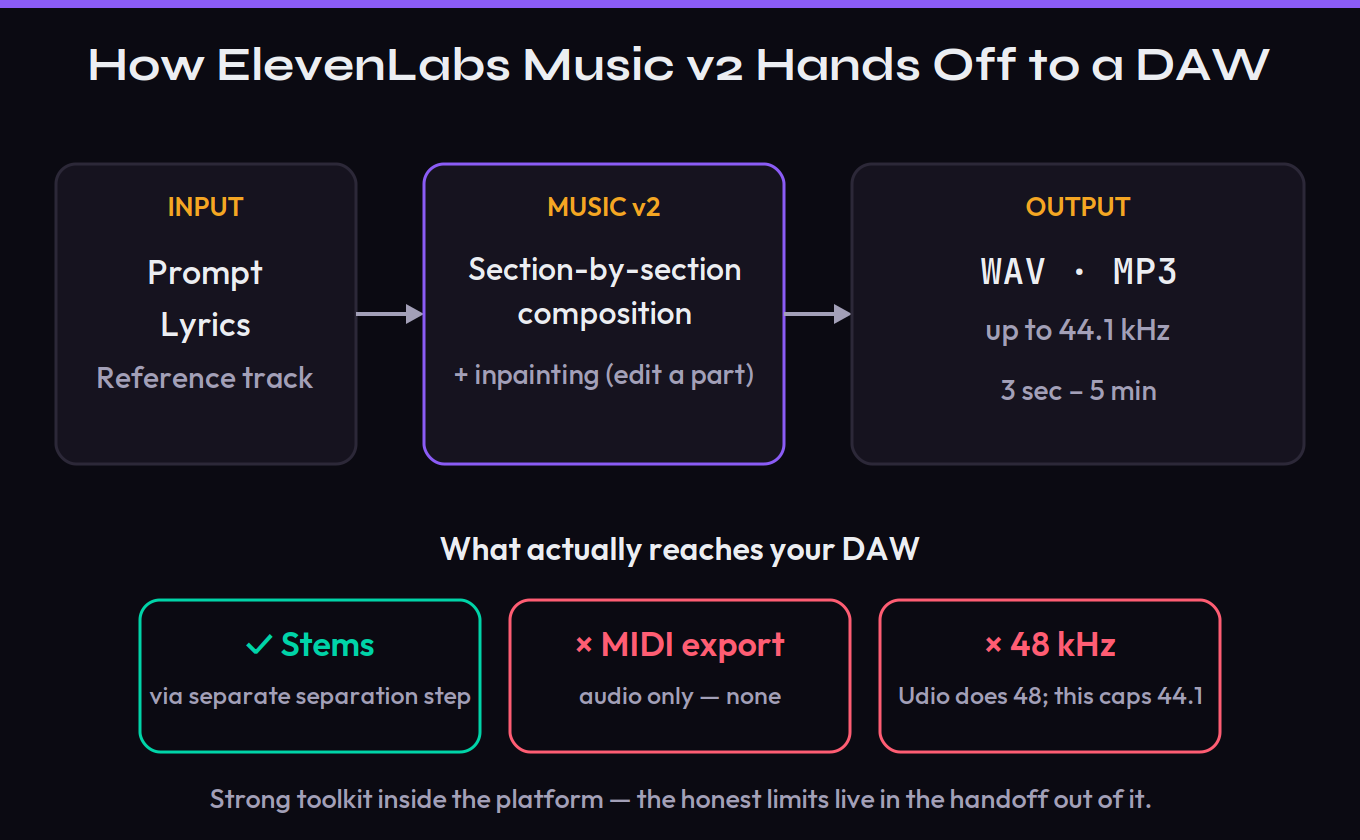
What does that mean in practice? If your workflow is “generate a finished bed or song and use it,” the export story is fine — pull a WAV and you’re done. If your workflow is “generate raw material and rebuild it with my own instruments,” the missing MIDI is a real wall, and the separated stems are something to verify before you trust them rather than assume. This is the use/don’t-use line that listicles skip: ElevenLabs is excellent at producing clean, licensed audio and merely okay at handing that audio to a producer who wants to take it apart. Know which of those two you are before you subscribe.
Licensing & Commercial Use: What “Clean” Actually Covers
For anyone monetizing, this section outranks every other in the review, because it’s where the marketing and the contract diverge. Start with the tiers. Free users get non-commercial rights only — the free app and free tier are for personal use, full stop. Paid self-serve plans grant commercial use across most online and offline cases: YouTube, podcasts, social video, advertising, and gaming are all in. The exclusions are the part that matters: on self-serve, film, TV, and Studio Games are not covered and require an Enterprise plan, where all commercial use is permitted.
Then the one that stops a release pipeline cold. ElevenLabs runs a Music Marketplace where creators publish and earn, and its licenses are explicit that some uses need a custom Enterprise agreement — TV, film, cinema, and streaming-platform (VOD/OTT) placements among them — and that distribution to music streaming services like Spotify, Apple Music, and SoundCloud is not permitted under any license. If your plan was “generate a song and put it on Spotify for streaming revenue,” read that line twice. For your own self-serve generations the online-commercial grant is broader, but the spirit is the same: this is a tool built to score content, not to manufacture releases.
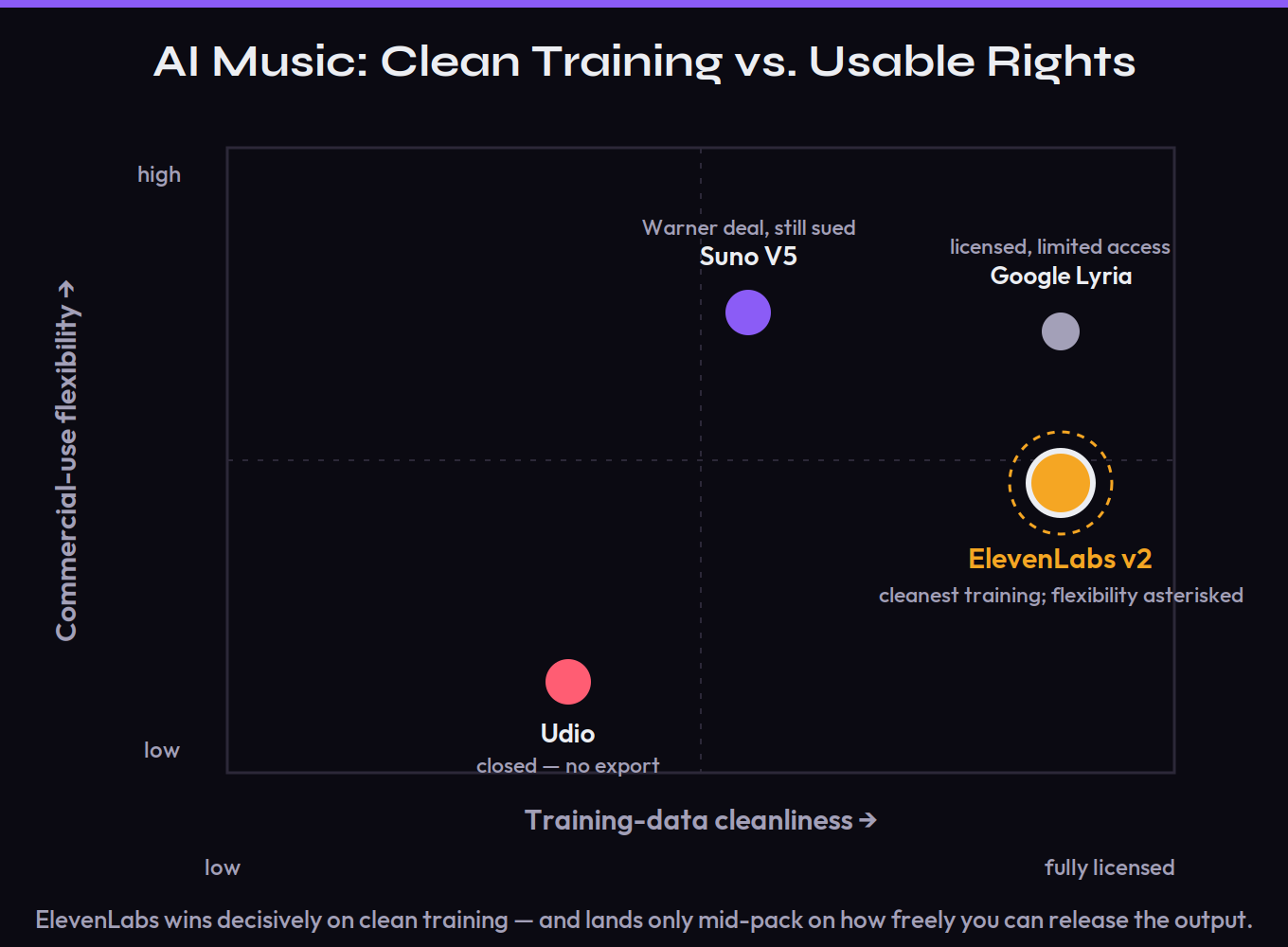
Make it concrete, because the tier names hide the actual decision. A YouTuber scoring videos: covered on a paid self-serve plan, with no asterisk that matters. An agency cutting a national TV spot: not covered on self-serve — that’s an Enterprise conversation before a single frame airs. An indie artist who wants to drop an AI-assisted single on Spotify for streaming royalties: the hardest case, because the Marketplace bar on streaming distribution and the open question of whether the track is even copyrightable point the same direction — don’t build that plan on generated audio you haven’t substantially transformed into your own work. A game studio: fine for most titles on self-serve, but “Studio Games” are specifically carved out to Enterprise, so read that definition against your studio’s size and budget. The pattern across all four is the useful takeaway: the further your use sits from “online content I control,” the more the licensing tightens — and the more you need it confirmed in writing for your exact plan before you commit a deadline to it.
There’s a deeper rights point worth naming, because it’s tool-agnostic and load-bearing. “Cleared for commercial use” is not the same as “you own a copyright in this.” A Munich court has already held that prompting an AI generator does not earn the user a copyright in the result, and the U.S. Copyright Office requires meaningful human authorship for protection. So a purely AI-generated ElevenLabs track may be something you’re licensed to use but cannot own, register, or defend like a normal song — which is fine for a podcast bed and a genuine problem for a catalog you hoped to monetize and protect. And one honest note in ElevenLabs’ favor and against it at once: a “fully licensed” platform still routes payment to labels and publishers, which means session musicians on work-for-hire — who don’t own their performances — can sit outside the compensation perimeter even on the clean option. The rights picture is better here than anywhere else in the category. It is not simple. If you’re planning to release, read our guides on releasing AI music and whether you can copyright it before you commit a schedule to any generator, this one included. This is general information, not legal advice.
Pricing & the Real Cost
Pricing moved in your favor at the v2 launch, which is rare enough to note. ElevenLabs cut music pricing by up to 50% for the API and up to 40% for ElevenCreative self-serve customers, framing it as lowering the cost of commercial use. There’s a free, non-commercial tier to kick the tires — the app hands you a small daily allotment of generations — and paid music runs on ElevenLabs’ subscription plans, where the number of credits a generation costs varies by plan because it’s pegged to a fixed cash price rather than a flat credit rate.
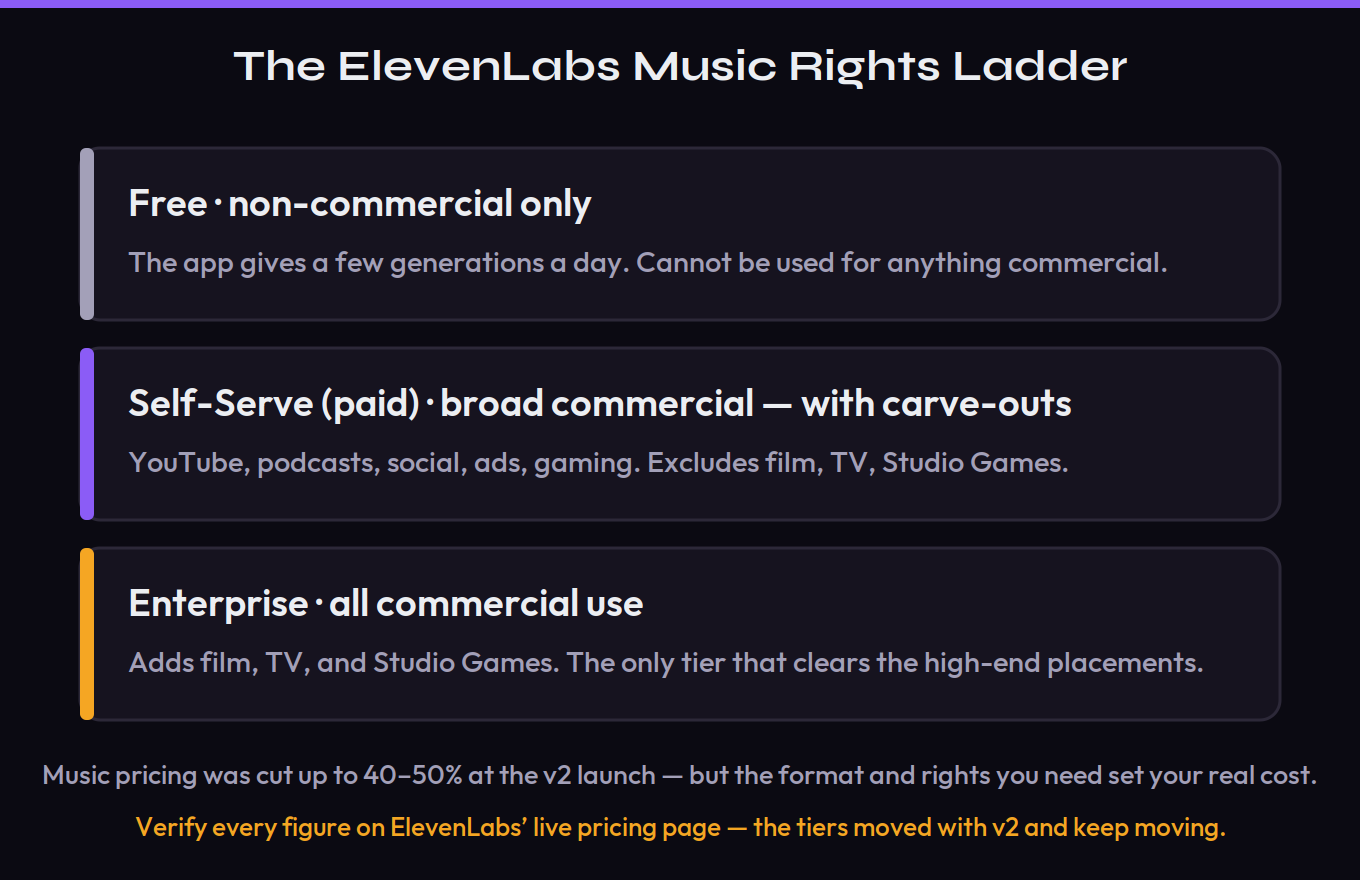
The cost that bites isn’t the sticker; it’s the gating. Higher-quality downloads (PCM/WAV at 44.1kHz) unlock at the Pro tier and above, so the format a producer actually wants sits above the entry plan. And the rights you may need most — film, TV, studio games — aren’t a paid add-on at all on self-serve; they’re an Enterprise conversation. So work the math against what you’re really doing: if you’re scoring YouTube and ads, a mid self-serve plan is genuinely good value after the price cut; if you need WAV plus any of the gated uses, your effective cost is higher than the headline and may route you to a sales call.
Run it as a monthly figure the way you actually work, not the way the pricing page frames it. A content creator who needs MP3 beds for online video can likely live on a lower self-serve tier and treat the v2 price cut as found money. A producer who wants Pro-tier WAV for client deliverables pays for that format gate every month whether or not they ever use the full ceiling, so the “entry price” was never really their price. And anyone who needs film, TV, or studio-game rights isn’t comparing monthly plans at all — they’re negotiating an Enterprise contract, which means the “cheap AI music” framing never applied to them in the first place. Decide which of those three you are before a sticker price tells you a story about value that doesn’t match what you’re actually going to do with the tool.
Because the tiers and numbers shifted with v2 and keep moving, treat any figure here as a pointer and confirm the current table on ElevenLabs’ live pricing page before you subscribe.
ElevenLabs vs the Field (June 2026)
No single tool wins outright; they optimize for different jobs, and the 2026 legal weather is now as decisive as the audio. The table below is the honest shape of the field, on the two columns producers actually decide on — whether you can get the audio into a DAW, and how safe the output is to monetize.
| Tool | Best at | DAW / export | Rights position (June 2026) |
|---|---|---|---|
| ElevenLabs Music v2 | Clean rights, multilingual vocals, content scoring | WAV + MP3 + stem separation; no MIDI; 44.1kHz | High — licensed training, no major-label suit |
| Suno V5 | Best finished songs, expressive English vocals | Stems + browser editor; no MIDI | Mixed — Warner deal, but UMG/Sony suits + GEMA ruling pending |
| Udio | Cleanest 48kHz mix, mature inpainting | Closed — reportedly no export off-platform | Mixed — settled UMG/WMG; Sony still litigating |
| Mureka | Deepest production toolkit, real MIDI | MIDI + stems + agentic Ableton app | Low — active copyright suit |
The frame the listicles miss: in June 2026, ElevenLabs is the only one of these you can both use with no active major-label lawsuit against it and actually export audio from. Suno is the better songwriter but still carries a legal cloud — it settled with Warner, yet Universal and Sony are still litigating, a U.S. fair-use ruling is expected mid-2026, and a German GEMA verdict lands July 31, 2026. Udio has the cleanest mix and the most mature inpainting, but its settlement turned it into a closed ecosystem you reportedly can’t export from — a dealbreaker if you finish in a DAW. Mureka has the deepest toolkit and real MIDI but an open copyright suit over its “royalty-free” claim. So the “safety premium” people wrote off as eroding hasn’t eroded so much as the rivals have split into litigation limbo and walled garden — which makes ElevenLabs’ exportable-and-unsued position more distinct, not less. For deeper head-to-heads, see our Suno review, Udio review, and the best AI music generators of 2026.
The legal calendar is the part to watch, because it could reshape this table fast. A U.S. fair-use ruling in the Suno and Udio cases is expected mid-2026, and Germany’s GEMA verdict against Suno lands July 31, 2026 — either could move how “safe” the litigated tools really are, and not necessarily in the direction you’d guess. Suno has the war chest to fight regardless, having raised a reported $400 million at a $5.4 billion valuation, so it isn’t going anywhere. But the strategic point stands: ElevenLabs bought its way to a clean position before the lawsuits, and the rivals are now spending years and millions to reach a version of where it already sits. If those rulings go badly for the scrape-first camp, the “licensed from day one” bet looks prophetic; if they go well, ElevenLabs’ edge narrows to workflow and rights flexibility. Either way, it’s the only one of the four whose business model doesn’t hinge on a court’s opinion — and for anyone making commercial content, that stability is worth a real premium.
Who Should Use It — and Who Shouldn’t
Use ElevenLabs Music if you make commercial content and want the cleanest licensing in the category without a lawsuit hanging over it: YouTubers, podcasters, course creators, agencies, and brand teams who need usable, rights-clean tracks fast, especially in languages other than English. For that person, on a paid self-serve plan, v2’s vocals, multilingual reliability, inpainting, and section-by-section control make it arguably the rational default in 2026 — you get studio-grade audio with a licensing story you can actually explain to a client’s legal team.
Be cautious or look elsewhere if you’re a producer who treats AI output as raw material to rebuild — the missing MIDI and the 44.1kHz ceiling will frustrate you, and Mureka or Udio may fit better on pure capability or fidelity. And think hard before you build a release pipeline on it: the self-serve restrictions on film/TV/studio games, the Marketplace bar on streaming distribution, and the open question of whether you even own AI output mean a streaming-revenue plan can hit a wall the marketing never mentions. The capability is real and the rights are the cleanest going. Match it to the job — content scoring, not catalog building — and it delivers exactly what it promises, asterisks and all.
Put ElevenLabs Music to the Test: Three Exercises
Twenty focused minutes inside the tool, plus ten reading the terms, will teach you more than any review. These three graded exercises are built to expose exactly where v2 shines and where it bites.
- Prompt a full track in a style you know well — specify genre, tempo, mood, and vocal style — and listen end to end.
- Use inpainting to regenerate just one section (say, the chorus) without touching the rest. Note whether the new section actually fits the parts you kept.
- Decide honestly: did sectional editing get you to a usable result faster than re-rolling the whole thing would have? That’s the v2 control story, tested on your own ears.
- Download a track you like as WAV (note which tier unlocks the higher-quality download), then run stem separation and pull the parts into your DAW.
- Check the stems: are they clean, and does a track generated “no vocals” truly come back without a vocal stem? Verify, don’t assume.
- Now try to do something that needs MIDI — re-voice the lead with your own instrument. Feel where the handoff stops, and decide if that wall matters for how you actually work.
- Read the Music Terms, the Model-Specific Terms, and the Marketplace license end to end, and write down which of your use cases (YouTube, client ad, film placement, Spotify release) are permitted on the exact plan you’d buy.
- Run a finished track through an AI-detection check and a LUFS meter; note integrated loudness and true peak against a −14 LUFS streaming target.
- Write the one-line answer to “can I legally ship this, the way I intend to ship it?” If you can’t answer it cleanly, that’s the review’s real verdict for your situation.