If you are a Pro-C 2 owner deciding whether the ~$82 upgrade is worth it, the honest answer is simpler than the feature list makes it look: Pro-C 3 is not a better transparent compressor — it is the same transparent compressor with color, immersive audio and a deeper sidechain bolted on. So upgrade if you ever reach outside FabFilter for analog character (opto, vari-mu, tube "glue"), if you mix in Dolby Atmos, or if you want the new 6-band sidechain EQ and tempo-synced triggering. Stay on Pro-C 2 if you only ever use the Clean and Transparent styles for surgical gain reduction — it does that job identically, for $179, and it is not "worse" software. If you own neither, buy Pro-C 3 ($199): you get the clean engine plus everything new for $20 over the older version. The rest of this page shows you exactly which of those three people you are.
This article contains affiliate links. If you purchase through our links, we may earn a commission at no extra cost to you. This does not affect our editorial independence — every recommendation here is based on genuine, source-checked assessment.
| Axis | Pro-C 2 | Pro-C 3 |
|---|---|---|
| Transparent compression | 9.2 | 9.2 |
| Color & character | 6.0 | 9.2 |
| Sidechain control | 8.2 | 9.4 |
| Workflow & interface | 8.8 | 9.2 |
| Immersive / Atmos | 6.5 | 9.3 |
| CPU efficiency | 9.0 | 8.4 |
| Value for the job | 9.0 | 8.8 |
| Overall | 8.6 | 9.0 |
Scores are MPW editorial judgement, defended axis by axis below — a decision framework, not a first-party measurement. Specs and prices verified June 24, 2026 against FabFilter's current product pages and 2026 launch coverage and reviews. Prices are USD; upgrade, education and bundle pricing move constantly, so confirm at FabFilter before you buy.
Updated June 2026 — FabFilter Pro-C 2 vs Pro-C 3
Read the overall numbers and you would think Pro-C 3 wins comfortably, 9.0 to 8.6. Read the axes and the real story appears. The two compressors are a dead heat on the thing Pro-C is famous for — transparent compression (9.2 each) — and Pro-C 2 actually edges ahead on CPU efficiency (9.0 vs 8.4) and value for a transparent-only workflow (9.0 vs 8.8). Pro-C 3 takes the overall purely on breadth: it adds an entire dimension of color (9.2 vs 6.0), a far deeper sidechain (9.4 vs 8.2) and real immersive support (9.3 vs 6.5) that the older plug-in simply does not have. If those three axes describe work you actually do, the upgrade is obvious. If they describe work you never touch, the overall number is lying to you, and you already own the right compressor. Every one of these decimals is argued below.
What Pro-C 3 Actually Changes
Here is the thing almost every "Pro-C 3 vs Pro-C 2" page gets backwards. They open with the six new compression styles as if FabFilter rebuilt the compressor. It didn't. The transparent core — the Clean, Classic, Opto, Vocal, Mastering, Bus, Punch and Pumping styles that made Pro-C 2 the default surgical compressor in thousands of templates — is carried into Pro-C 3 essentially intact. If you load the same Clean-style settings in both, you are working with the same engine. If you want the ground floor on what that engine is doing, our compression entry covers the fundamentals. That continuity is the single most important fact in this whole comparison, because it means the upgrade is not about getting better at the job Pro-C already did. It is about getting new jobs.
What genuinely changed sorts into three buckets, and almost nothing falls outside them: color (the six new styles plus the Character saturation modes), immersion and triggering (Dolby Atmos, host-tempo sync, the deeper sidechain), and workflow (the redesigned interface and the Instance List). Notice what is not on that list: nobody at FabFilter claims the clean algorithms got cleaner or more accurate. The diagram below lays the whole delta out so you can see at a glance which side of the line each feature lands on. If you have ever wanted to know what a compressor is actually for beyond catching peaks, the new column is the answer — it is Pro-C finally saying yes to tone.
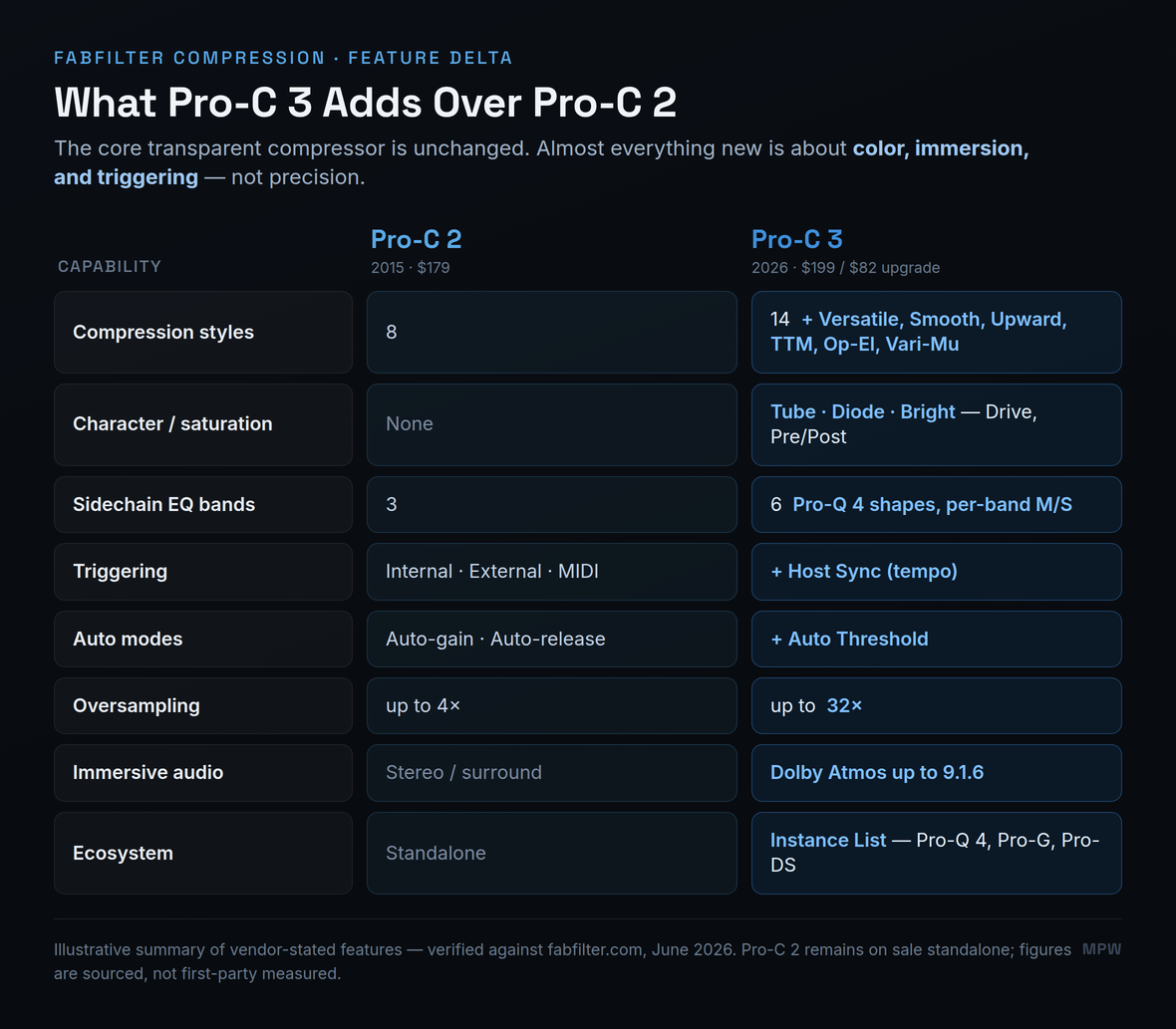
This is also why the price gap is so small. Pro-C 3 lists at $199 against Pro-C 2's long-standing $179, and the upgrade for existing owners is roughly $82. FabFilter is not charging you for a rebuilt compressor; it is charging you for an expansion pack of color and immersive features on top of a compressor you may already trust completely. Whether that expansion is worth $82 to you is the only question that matters, and it depends entirely on the kind of work you do — which is exactly what the next sections sort out. For the full standalone evaluation of the new plug-in on its own terms, our FabFilter Pro-C 3 review goes deeper on each new style; this page is about the upgrade decision specifically, and the two are designed to be read together rather than repeating each other.
The New Styles and Character Modes
The heart of the upgrade is the move from eight styles to fourteen, and the part that will actually change how your mixes sound is the arrival of character. Pro-C 2 was, by design and by reputation, ruthlessly clean. That was its identity and, for a decade, its selling point. But ask any engineer who reached for an opto or a vari-mu emulation from another developer mid-mix, and you will hear the same thing: Pro-C was the compressor you used when you wanted the gain reduction to be invisible, and you went elsewhere when you wanted it to be felt. Pro-C 3 closes that gap. The new Op-El and Vari-Mu styles model the soft, slow, program-dependent behaviour of classic optical and variable-mu hardware, and the new Character section adds three flavours of analog-style saturation — Tube, Diode and Bright — with a Drive control and the option to place the coloration before or after compression.
That matters more than a spec line suggests. The whole reason producers keep a drawer of compressor plug-ins is that different jobs want different personalities: a transparent peak-catcher for a lead vocal, a gluey opto for a mix bus, an aggressive FET for parallel drums. Pro-C 2 only ever offered the first of those convincingly. With the Vari-Mu style and a touch of Tube drive, Pro-C 3 can now do the slow, spongey, saturated thing in a couple of clicks — the kind of move you would previously have left FabFilter to accomplish. If you find yourself frequently layering a saturator after your compressor to add the warmth the compressor stripped out — and if you are matching levels by ear as you go, our makeup gain entry and the gain reduction calculator keep the gain-staging honest — the Character modes are aimed squarely at you, and they overlap meaningfully with what you would otherwise reach for in FabFilter Saturn 2. They do not replace a dedicated saturation unit, but they fold a usable amount of it into the dynamics stage where it often belongs.
The two remaining additions are quieter but worth knowing. Versatile is FabFilter's new general-purpose style, tuned to behave sensibly across a wide range of sources so it can be your sane starting point before you reach for something more specialized — the style you load when you do not yet know what the part needs. Smooth is the gentlest of the program-dependent styles, designed to react slowly and musically so the compression all but disappears on sustained material like pads, strings and soft vocals. Neither is the headline reason anyone upgrades, but together they fill the gaps between the surgical originals and the new colored extremes, so the fourteen styles cover a genuinely continuous range from invisible to characterful rather than clustering at the two ends. If you tend to audition a few styles before committing, that continuity quietly speeds the work.
The new Upward and TTM ("To The Max") styles point in a different direction — toward modern, loud, electronic production. Upward compression raises the quiet parts rather than taming the loud ones, which is the trick behind a lot of dense, in-your-face mixes, and TTM combines upward and downward behaviour across the band for maximum density. These are not subtle, transparent tools; they are effects. If your work lives in pop, hip-hop or electronic genres where loudness and impact are the point, they are a genuine reason to upgrade. If you are mixing acoustic or orchestral material where the goal is to preserve dynamics, you will likely never load them — and that is a perfectly honest reason to keep your money. The compression itself still follows the same rules it always did; if you want the fundamentals, our explainer on compression ratio (and the ratio entry) and the broader bus compression guide cover how these styles behave once you push them.
A Tale of Two Mixes
Abstract feature lists never settle an upgrade question, so picture the same engineer working two different records a week apart, because that is where the $82 either earns itself or doesn't. Monday's session is an acoustic singer-songwriter: one voice, one guitar, light room, the brief is "make it intimate and let it breathe." The engineer loads Pro-C 2 on the vocal in the Clean style, sets a gentle 2:1 ratio with a slow attack to keep the consonants, rides four or five dB of reduction on the loud lines, and the job is done. Nothing about that chain wants color. Nothing about it wants Atmos. Pro-C 3 would sit in that session doing the identical work with the identical result, and the engineer would have spent $82 to change a number in the plug-in's title bar. This is the transparent corner, and it is enormous — most mixing, most of the time, lives exactly here.
Thursday's session is the opposite record: a loud, modern synth-pop track that needs to feel dense, glued and rhythmic. On Pro-C 2, the engineer compresses the mix bus transparently, then opens a separate saturator after it to add the warmth the clean compression stripped, then opens a tempo-synced volume tool on the synth bus to get the pumping the brief asks for, then reaches for a dynamic EQ to stop the kick from triggering the bass too hard. Four plug-ins, four windows, four sets of latency and CPU. On Pro-C 3 the same result collapses into the dynamics stage: a Vari-Mu style with a little Tube drive does the glue and the warmth in one move, Host Sync triggering delivers the pumping with no routing, and the 6-band mid/side sidechain handles the kick-versus-bass conflict without a second plug-in. Same engineer, same ears, a third of the windows.
That is the whole comparison in one working week. For Monday's record, the upgrade is invisible and the money is wasted. For Thursday's, it consolidates a fistful of plug-ins into one, saves real session time, and arguably sounds more cohesive because the color and the dynamics are happening in the same place rather than stacked in series. The honest question is not "is Pro-C 3 better" — across both sessions it is the same transparent compressor — but "how many of your weeks look like Thursday?" An engineer whose calendar is all Mondays already owns the right tool. An engineer whose calendar is full of Thursdays is leaving workflow and money on the table by staying on Pro-C 2. Most people sit somewhere between, and the ratio of their own Mondays to Thursdays is the most reliable answer to the upgrade question that exists.
Sidechain, Auto Modes, and the Instance List
If color is the headline upgrade, the sidechain is the one working mixers will quietly use the most. Pro-C 2's sidechain EQ gave you a high-pass, a low-pass and one freely adjustable band — enough to stop a kick from triggering compression on a bass, or to keep sibilance from pumping a vocal, but not much more. Pro-C 3 expands the trigger EQ to six full bands, every one of them carrying the filter shapes from Pro-Q 4 — including all-pass and brickwall filters — and each band can be set to listen to the mid or the side signal independently. That turns the sidechain from a blunt instrument into a surgical one. You can now sculpt exactly what part of the signal opens the compressor, which is the difference between ducking that sounds like an effect and ducking that sounds like it was always there.
This is the single most relevant change for anyone whose bread and butter is sidechain compression — the rhythmic ducking that defines a huge amount of modern dance and pop production. Combined with the new Host Sync triggering, which outputs a steady tempo-locked pulse so you can dial in pumping without routing an external trigger track at all, Pro-C 3 becomes a credible alternative to the dedicated volume-shaping plug-ins many producers bought specifically because Pro-C 2 couldn't do tempo-synced ducking cleanly. If that describes a tool you currently keep on your buss for exactly this reason, factor its cost into the upgrade math — Pro-C 3 may quietly retire it.
A concrete example makes the difference obvious. Say a lead vocal is being knocked around by hard "s" and "t" sounds, but only in the chorus, and only on the left side where the double sits. On Pro-C 2 you would high-pass the sidechain to stop low energy triggering and hope the broad band caught it, then probably give up and add a separate de-esser. On Pro-C 3 you place a narrow band at the sibilance frequency, set it to listen to the side signal only, and let the compressor duck on that and nothing else — a de-esser built out of the compressor's own trigger path, aimed at one problem in one place. That is the kind of move the three-band sidechain simply could not make, and once you have done it a few times the six bands stop looking like a spec bump and start looking like a second plug-in you no longer have to open. The same logic extends to any spectral conflict — bass against kick, hat against vocal, room against close mic — wherever you need the compressor to react to part of a signal rather than all of it.
The quieter workflow wins matter too. Auto Threshold lets the threshold knob become level-independent, so the same amount of compression is applied regardless of how hot the incoming signal is — a genuinely useful thing when you are riding a part that changes level a lot, or processing dialogue. And the Instance List, inherited from Pro-Q 4.10, lets you see and control every FabFilter dynamics and EQ instance across your session from one window, turning a rack of plug-ins into something closer to a channel strip. The redesigned interface also adds an animated knee display, so you can finally see the soft-knee curve you are dialing in rather than inferring it from the gain-reduction meter. None of these will sell the upgrade on their own, but together they make Pro-C 3 feel like a 2026 plug-in in a way Pro-C 2, for all its quality, no longer quite does. For the broader picture of where it sits among current tools, our roundups of the best compressor plugins and the best plugins for mixing in 2026 place both versions against the wider field.
Immersive Audio, Oversampling, and CPU
For a growing slice of working engineers, this section is the entire decision. Pro-C 3 adds full Dolby Atmos support up to 9.1.6, with variable channel and stereo linking, where Pro-C 2 topped out at conventional stereo and basic surround. If you are delivering immersive masters — and more streaming and film work demands them every quarter — this is not a nice-to-have, it is a hard requirement, and Pro-C 2 cannot meet it. There is no workaround and no debate: if Atmos is in your deliverables list, you upgrade, full stop. The scorecard reflects that with a 9.3-versus-6.5 gap, the second-widest on the card, because for the people who need it the capability is binary.
Oversampling climbs from up to 4× in Pro-C 2 to up to 32× in Pro-C 3, which reduces aliasing when you are driving the compressor hard or using the new saturation — exactly the situations the Character modes invite. That extra headroom is real and welcome, but it is also where the one honest mark against Pro-C 3 lives. More algorithms, more saturation maths and higher oversampling all cost CPU. Pro-C 2, lighter by design, will run more instances on the same machine, and on a large session with a Pro-C on every channel that difference is not academic. This is the rare axis where the older plug-in genuinely wins, and we scored it that way: 9.0 to 8.4. If you build dense templates with dozens of compressor instances and you never touch the saturation, Pro-C 2's efficiency is a feature you would be paying to give up. Whatever you choose, getting your attack and release settings on vocals right — the attack and release entry and our attack/release calculator are the quickest way to dial them in — and that matters far more to your sound than the oversampling rate — the algorithm choice does the heavy lifting, not the sample multiplier.
One honest caveat on the oversampling, because the jump from 4× to 32× looks more decisive on paper than it is in practice. Very high oversampling only earns its CPU when you are driving the compressor hard or leaning on the new saturation, where it meaningfully reduces aliasing; on clean, gentle gain reduction the audible difference between 4× and 32× is vanishingly small, and running everything at maximum is mostly a way to heat your laptop. The right read is that Pro-C 3 gives you the headroom for when you need it — aggressive, colored, loud material — not that you should run it maxed out by default. Used sensibly it is a real advantage for the exact work that invites it; used as a number to max because it is there, it is just the CPU cost without the benefit.
When Pro-C 2 Is Still All You Need
This is the section the marketing will never write, so we will. Pro-C 2 is not obsolete, and for a large number of producers it is still the correct tool. If your relationship with a compressor is "set a ratio, set a threshold, catch the peaks, keep it clean," then Pro-C 2 does that as well as anything made — and exactly as well as Pro-C 3, because it is the same engine doing it. The transparent styles, the precise attack and release, the famous gain-reduction display, the best-in-class metering: all present, all unchanged in feel. Nothing about owning Pro-C 2 in 2026 makes your mixes worse. A page that tells a happy Pro-C 2 owner they are working with broken software is selling, not advising.
The clearest test is your own habits. Open your last ten projects and look at how you used Pro-C 2. If every instance is a Clean or Transparent style doing surgical control on a vocal, a buss or a master — the work covered in our vocal compression guide and our practical walkthrough of how to use compression on vocals — then Pro-C 3 would change nothing about those sessions except the version number. You would be buying six styles you never load, saturation you never engage, and Atmos you never deliver. That is a real way to spend $82 on nothing. The upgrade is only worth it when it unlocks work you actually do, and "transparent control" is precisely the work Pro-C 2 already finished. If you want to confirm a plug-in is even the bottleneck before spending, read our Pro-C 2 review — it lays out exactly how much compressor that $179 already buys you.
Should You Upgrade? The Decision Fork
Strip away the feature tour and the entire decision reduces to three questions, asked in order. The diagram below walks them; here is the reasoning behind each. One: do you ever reach outside FabFilter for analog color? If you regularly add opto, vari-mu, tube or "glue" character from another plug-in, Pro-C 3 brings that in-house and the upgrade starts paying for itself immediately. Two: do you mix in immersive, or need the 6-band sidechain and tempo-synced ducking? Any yes here is decisive — those features are Pro-C 3 only and have no equivalent in the older version. Three: do you only ever use Clean and Transparent modes? If you got this far answering no to the first two and yes to the third, you are a transparent-only user, and the right move is to keep Pro-C 2 and your $82.
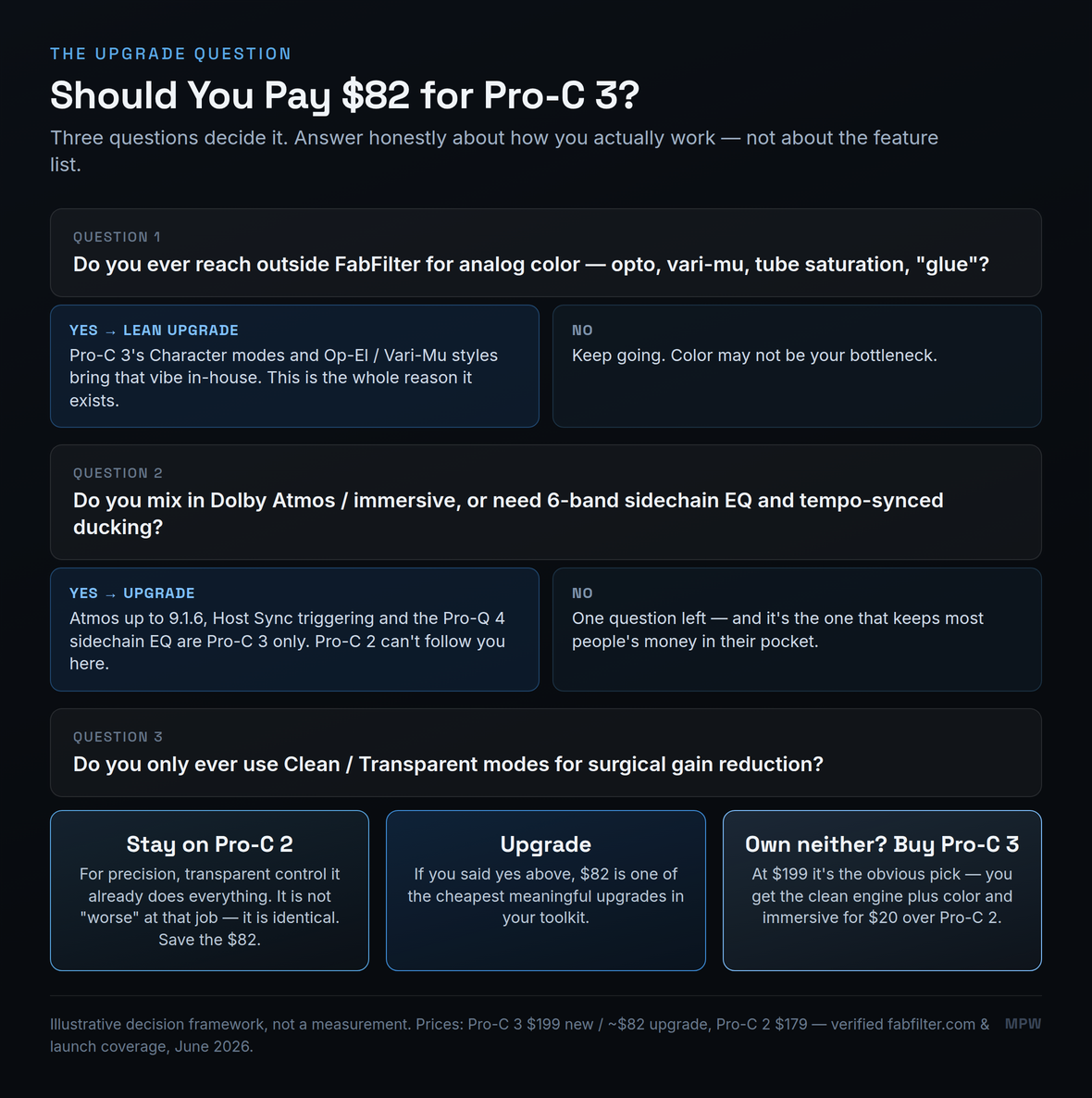
There is a fourth path the questions don't cover, and it is the easiest of all: if you own neither plug-in, buy Pro-C 3. The whole "is the upgrade worth it" tension only exists for people who already paid for Pro-C 2 and are deciding whether to pay again. A new buyer faces a $20 gap — $199 versus $179 — for a strictly larger plug-in. There is no scenario where saving $20 to buy the older version makes sense unless you specifically value its lighter CPU footprint above everything it lacks. For a fresh purchase, Pro-C 3 is simply the compressor to buy, and it slots straight into the same role Pro-C 2 has held in mixing templates for a decade.
Where Each One Wins
Plotted on the two axes that actually separate them — how much color you want, and whether you work in stereo or immersive — the two compressors stop competing and start dividing the territory. Pro-C 2 owns the bottom-left corner: transparent, stereo, surgical. That corner is not small, and it is not a consolation prize; it is where the majority of clean mixing and mastering lives. Pro-C 3 extends the same plug-in up and to the right, into colored and immersive work that Pro-C 2 was never built to reach.
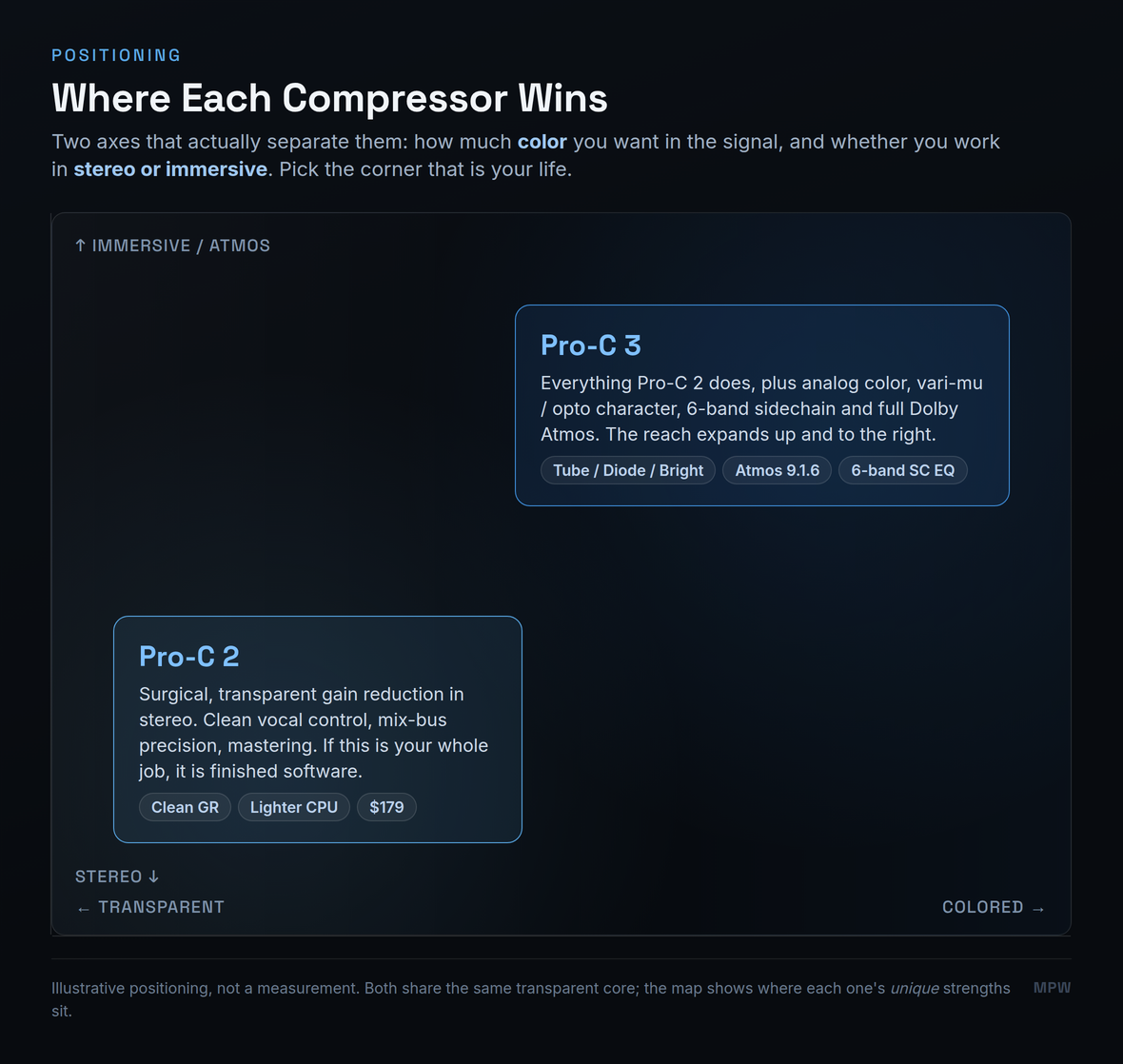
The practical reading: find the corner that is your daily life and the answer stops being a debate. A singer-songwriter mixing clean folk in stereo lives in the bottom-left and needs nothing Pro-C 3 adds. A producer cutting loud, characterful pop with rhythmic ducking lives on the right and benefits from almost every new feature. An engineer delivering Atmos lives at the top and has no choice at all. The matchup is not "which compressor is better" — it is "which corner do you work in," and the honest answer for most people is that they already know.
| Specification | Pro-C 2 | Pro-C 3 |
|---|---|---|
| Compression styles | 8 | 14 (+ Versatile, Smooth, Upward, TTM, Op-El, Vari-Mu) |
| Character / saturation | None | Tube, Diode, Bright (Drive + Pre/Post routing) |
| Sidechain EQ | 3 bands (HP / LP + 1 free) | 6 bands, Pro-Q 4 shapes, per-band M/S |
| Triggering | Internal / External / MIDI | + Host Sync (tempo-locked pulse) |
| Auto modes | Auto-gain, auto-release | + Auto Threshold |
| Oversampling | up to 4× | up to 32× |
| Immersive audio | Stereo / surround | Dolby Atmos up to 9.1.6 |
| Ecosystem | Standalone | Instance List (Pro-Q 4.10, Pro-G, Pro-DS) |
| Formats | VST/VST3/AU/AAX/CLAP/AudioSuite | VST/VST3/AU/AAX/CLAP/AudioSuite |
| Price (USD) | $179 (still sold) | $199 new / ~$82 upgrade |
Price and the Real Cost of the Upgrade
Let's settle the numbers, because a lot of older comparisons get them wrong — including, until recently, some of our own pages, which we have corrected. Pro-C 3 lists at $199 USD (€169 / £149 including VAT) as a new purchase, with an upgrade for existing Pro-C 2 owners of roughly $82 USD (about £72). Pro-C 2 is still sold standalone at $179, the price it has held since 2015 — FabFilter did not discontinue it, it simply moved alongside the new flagship. So the two are not "priced identically," a claim you will see repeated across the web; Pro-C 3 costs $20 more new, and the upgrade is its own separate, smaller figure. Reseller sale prices (Thomann, Plugin Boutique) drift below FabFilter's list at times, so check the current number before you buy.
For an existing owner, then, the real question is whether $82 buys you enough new capability to matter. If you answered yes to either of the first two fork questions — color or immersive — it is one of the cheapest meaningful upgrades in a plug-in folder; you are paying boutique-saturator money to fold color and Atmos into a compressor you already trust. If you are a transparent-only user, $82 buys you styles you won't load, and the smarter spend is to keep Pro-C 2 and put the money toward something that addresses an actual gap in your chain. The plug-in is not the variable here — your work is. Price the upgrade against the jobs it unlocks, not against the length of the feature list, and the decision makes itself.
Practical Exercises
The fastest way to turn this from an abstract feature argument into your own decision is to put each fork question to a concrete test. Work through these three graded exercises — even with nothing more than the Pro-C 3 demo, your existing Pro-C 2 and an honest look at your own recent sessions — and the answer stops being a debate about specs and becomes a fact about the way you work.
- Open your last ten finished projects and look at every Pro-C 2 instance. For each one, note which style was loaded. If the answer is overwhelmingly Clean, Transparent or Mastering, you already have your headline: you live in the transparent corner Pro-C 2 was built for.
- Now count how many times, on those same projects, you opened a separate saturator, an opto emulation or a vari-mu plug-in after Pro-C 2 to add the character it doesn't make. Every one of those is a job Pro-C 3 would have folded into a single window.
- Write down the two tallies side by side. If the first is large and the second is near zero, the upgrade buys you styles you won't load. If the second tally is climbing, you have just measured the exact gap Pro-C 3 fills — in your own mixes, not in a marketing list.
- Take a vocal or a drum bus you have already mixed with Pro-C 2. Bypass your existing chain, install the Pro-C 3 demo, and rebuild the same gain reduction using a transparent style first. Null it against the Pro-C 2 version if you can — the point is to prove to yourself that the clean engine is the same, so the upgrade money is clearly not buying transparency.
- Now switch the Pro-C 3 instance to Op-El or Vari-Mu, add a touch of Tube or Diode character with the Drive control, and A/B it against your transparent original. Listen for the thing you normally chase with a second plug-in — the glue, the forward midrange, the controlled grit.
- Decide honestly whether that colored version is a sound you reach for. If it makes you want to redo old mixes, the $82 is buying a tool you will actually use. If you prefer the clean version every time, you have just confirmed Pro-C 2 is finished software for you.
- List every plug-in you currently load to do something Pro-C 3 now does in one window — a separate saturator for color, a dedicated de-esser or dynamic EQ for spectral ducking, a second compressor for parallel character. Total what you paid for them, or what their subscription costs you per year.
- Now project the next three years honestly: how many sessions will genuinely use Pro-C 3's color, 6-band sidechain or Atmos routing, versus how many would have been fine on Pro-C 2? Multiply the $82 across that real usage, not across the feature list.
- Compare the upgrade cost against both the plug-ins it could replace and the workflow time it saves you. The exercise's point is to price the upgrade against the jobs it unlocks in your calendar — and to notice that for a colorist or an Atmos engineer it pays for itself almost immediately, while for a transparent-only mixer it never quite does.