Most FabFilter Saturn 2 reviews do the same thing: they list the twenty-eight distortion styles, screenshot the modulation flow, repeat the word “creamy,” and award four-and-a-half stars. None of that answers the question you actually showed up with. You don’t need a feature tour — you can read those on FabFilter’s own page. You need to know whether a $149 multiband saturator earns a slot in a chain that probably already has Decapitator, RC-20, and a stock saturator that costs nothing.
So here is the honest version first. Saturn 2 is the best surgical saturator most producers can buy, and the reason has almost nothing to do with the style count. It’s the multiband design: you can drive the lows for weight without smearing the highs, glue the mids while leaving the air untouched, and shape harmonics per frequency band the way a mastering engineer thinks about a mix — in one box, with the cleanest interface in the category. That capability is real and it’s genuinely hard to get any other way. But it is also exactly why Saturn is the wrong first purchase for a lot of people, and why “just buy Saturn” is lazy advice.
How we approached this. We re-verified every price, version, format, and feature claim against FabFilter’s live store and product pages this session, plus current third-party reviews — not older write-ups, several of which still describe Saturn 1. This is a reasoning-and-documentation review, not a first-party measured bench: we did not run a controlled distortion-analysis test in our own room, so every judgement about how Saturn sounds is framed as reasoning from documented behaviour and the consensus of engineers who use it daily — never a fabricated “the THD measured” claim, and the diagrams below are labelled illustrative for the same reason. Where a number can move — the price especially, since FabFilter runs sales — we tell you to confirm it live. Let’s get into it.
FabFilter Saturn 2 is the most precise, best-sounding multiband saturator you can run, with twenty-eight distortion styles, a deep modulation system, and FabFilter’s signature clean workflow. Buy it if you genuinely use multiband, modulation, or amp-style range — if “drive the low end without dulling the highs” or “add warmth that moves with the track” is a thing you actually do. Skip it if you only ever want one-knob warmth; stock saturation plus a $0–$30 character box covers that, and Decapitator or RC-20 will get you there with more personality. At $149 in a crowded field, Saturn earns its price on control, not on character. Treat it as the surgical tool in the kit, and it’s superb. Buy it expecting it to replace every other saturator, and you’ll have overspent for knobs you never touch.
The Verdict
The cleanest, most controllable multiband saturator on the market — worth $149 if you actually use per-band drive and modulation, hard to justify if you only want one-knob warmth.
| Sound quality (harmonic character) | 9.3 | |
| Multiband flexibility | 9.1 | |
| Modulation depth | 8.8 | |
| Workflow & interface | 8.3 | |
| CPU & oversampling | 8.5 | |
| Value (price vs a crowded field) | 7.9 |
That 8.8 is a defended judgement, not an average of the rows, and the spread is the whole argument. Sound quality (9.3) and multiband flexibility (9.1) are where Saturn leads the category outright — the harmonic models are clean and musical, and nothing else gives you this much independent control over saturation per frequency band in an interface this legible. Modulation depth (8.8) is a genuine differentiator most people under-use. CPU and oversampling (8.5) is strong, with Good and Superb HQ modes that let you trade aliasing for processor load deliberately. Workflow (8.3) loses a touch for two honest nits reviewers raise: a couple of output controls are tucked away and preset browsing is more manual than it should be. The number that pulls the overall back down is Value (7.9) — $149 is real money in a market where excellent saturation is available cheaper, so the price only pays off if you use what makes Saturn special. Every one of those numbers is defended in the sections below.
What FabFilter Saturn 2 Actually Is
Get the category right first, because it’s where most of the buying confusion lives. Saturn 2 is a multiband distortion and saturation plugin. If you’re fuzzy on the underlying effect, our primer on what saturation actually does in music production is the right place to start, and the practical companion on how to use saturation covers the moves you’ll make in any saturator. Saturation adds harmonics — new frequency content generated from the signal you feed in — and those harmonics are what we hear as warmth, weight, presence, grit, or outright distortion depending on how hard you push and what flavour of clipping curve does the pushing.
What separates Saturn from a single-knob box is the word “multiband.” Most saturators apply one flavour of harmonic generation to the whole signal at once. Saturn splits the incoming audio into up to six frequency bands, lets you apply a different distortion style and a different amount of drive to each, and recombines them. On top of that sits twenty-eight distortion styles (tube, tape, transformer, guitar-amp models, and creative FX), per-band controls for drive, mix, feedback, dynamics, tone and level, and a modulation system deep enough to make any of those parameters move over time. The whole thing is the saturation equivalent of reaching for a multiband compressor instead of a single-band one: more setup, far more precision. For the theory underneath, our Bible entries on saturation and harmonic distortion go deeper than any plugin manual will.
Mechanically, you insert Saturn on a track, bus, or master; the analyzer shows you the spectrum; you set crossover points to carve the bands you want; and you drive each band into whichever distortion model suits it. It runs in every format that matters — VST, VST3, AU, AAX, AudioSuite, and now CLAP — on macOS and Windows, with sidechain support, a fully resizable interface, and the two high-quality oversampling modes. None of that is exotic. The exotic part is the freedom to treat saturation as a per-band decision, which is the whole reason the rest of this review exists.
The Real Idea: Saturation You Can Paint Per Band
Here is the thesis the marketing buries under the style count, and it’s the single most useful way to think about whether you need this plugin. Global saturation is a blunt instrument: when you drive a full mix or a full bus into a single saturator, the loudest, densest part of the signal — usually the low end — hits the distortion curve hardest and generates the most harmonics, which tends to smear the bass and muddy everything sitting above it. You wanted warmth on the body of the track and you got a haze over the whole thing. That trade-off is why a lot of producers conclude they “don’t like saturation on the master.”
Multiband fixes the blunt-instrument problem by letting you make saturation a local decision. Drive the lows for weight and density without letting that drive bleed into the highs. Add tube warmth and glue across the mids where the vocal and the core of the instruments live, while leaving the top octave clean so cymbals and air stay crisp. Push a touch of bright transformer or tape grit into the highs alone for presence, independent of what you’re doing lower down. This is exactly how a mastering engineer reasons about a mix — in frequency zones, not as one undifferentiated block — and Saturn puts that reasoning into a single saturator. If you’ve ever wanted to thicken a bassline without losing its definition, the per-band approach is the answer, and it pairs naturally with the broader moves in our guide to mixing bass.
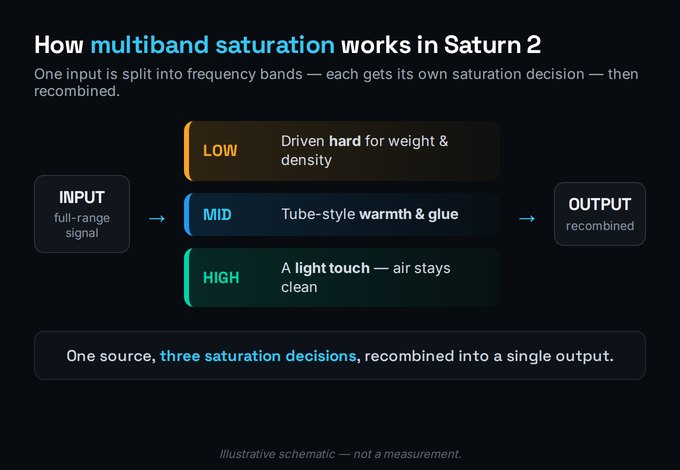
Once you internalise that, the rest of Saturn’s feature set stops looking like clutter and starts looking like the tools you need to execute the idea: crossovers with selectable slopes up to 48 dB per octave so the bands hand off cleanly; per-band drive and mix so you can blend the distorted signal back against the dry one (parallel saturation, band by band); per-band dynamics so the saturation can respond to how hard the band is playing; and per-band tone so you can shape the harmonics each band generates. Every one of those exists to make “saturation you can paint per band” controllable rather than chaotic.
Single-Band vs Multiband: Why It Matters on a Bus
The fork that decides whether Saturn is worth $149 is simple: do you actually need multiband, or would a great single-band saturator do everything you want? Be honest about it, because the answer determines the spend. On a single mono source — one vocal, one bass, one snare — single-band saturation is often the better choice. It’s faster, it has more one-knob character, and you usually want the same harmonic treatment across that source’s whole range anyway. This is where a Decapitator or an RC-20 shines and where reaching for Saturn is overkill.
Multiband earns its keep when the source is wide: a full drum bus, an instrument bus, a stereo submix, or the master. On a full drum bus, you might want grit on the snare’s mid-band crack and weight on the kick’s sub, but you do not want the same drive smearing the hi-hats — multiband lets you have both, which is why it slots so well into a serious drum-mixing chain. On a full mix, multiband is the difference between “saturation made it louder and muddier” and “saturation made it bigger and clearer.” The reasoning is the same one that makes engineers reach for a multiband compressor over a single-band one when a source is too spectrally varied to treat as a whole.
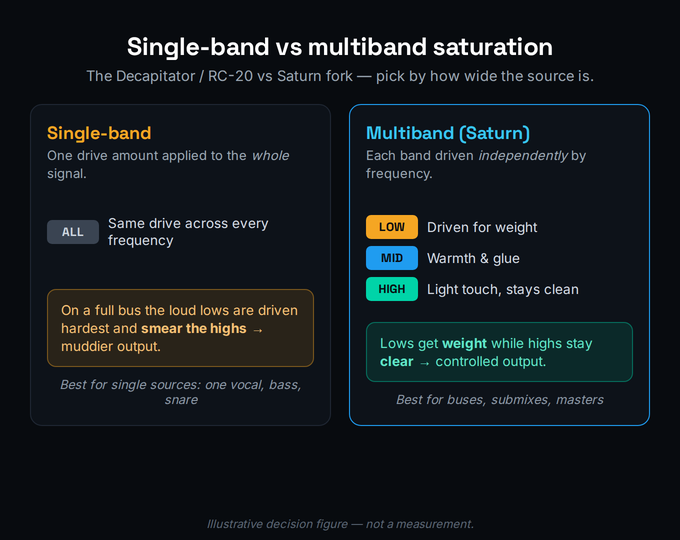
So before you buy, audit your own sessions. If your saturation almost always lives on individual tracks — a little grit on the vocal, some warmth on the bass — you may genuinely be better served by a couple of characterful single-band boxes and the saturation already in your DAW. If you regularly want to treat buses and submixes, or you do any mastering, the per-band control is the thing you’ve been missing, and that’s where Saturn stops being a luxury and becomes the right tool. Either way the question is about your workflow, not Saturn’s quality, which is not in doubt.
The 28 Distortion Styles — and Which You’ll Actually Use
Saturn 2 nearly doubled the original’s sixteen styles to twenty-eight, and the honest truth is you’ll live in about six of them. The styles fall into families. The Tube models (including new “Subtle” variants) are your everyday warmth and gentle harmonic enrichment — the ones you reach for on vocals and buses when you want presence without obvious distortion. The Tape models add the soft compression and high-frequency smoothing people chase from analog tape; if tape character is specifically what you’re after, it’s worth comparing dedicated options in our roundup of the best tape saturation plugins, because a focused tape emulation sometimes nails that one job better than a generalist.
The Transformer styles (Subtle, Gentle, Warm) open up a slightly abrasive, iron-core character that’s great for adding edge to dull sources. The guitar-amp models — British Rock and Pop, American Tweed and Plexi — are genuine amp-style distortion, useful well beyond guitars for mangling synths, drums, and parallel-blended grit. And the creative FX styles like Foldback and Breakdown are the sound-design end: bit-crushing, rectification, and the kind of destruction you blend in rather than commit to. In practice, a working producer keeps a Subtle Tube for warmth, a Tape for glue, one amp model for aggressive character, and treats the rest as occasional tools. The breadth is real, but don’t let it convince you that you need all twenty-eight — you don’t.
Where the style range genuinely pays off is in tandem with the multiband split. A bright Transformer or amp model on the highs alone behaves like an exciter, adding presence; a warm Tube on the mids glues without dulling; a touch of Tape on the lows adds density. Doing that with one saturator would be impossible, which is the recurring theme of this review. The same logic applies to finishing sources like professional-sounding vocals, where a little band-specific saturation can add the air and body that EQ alone can’t synthesize, because saturation creates new harmonic content rather than just rebalancing what’s there.
One practical note on auditioning all these styles: the brighter, more aggressive models generate a lot of high-frequency harmonic content, and that is exactly where digital aliasing creeps in if your oversampling is set too low. Saturn 2 defaults to a sensible quality level, but when you are leaning on a Transformer or amp model hard, bumping oversampling to Superb for the final render audibly cleans up the harsh, gritty top end that aliasing produces. It costs CPU, so the smart workflow is to mix at the lower setting and switch to Superb only on bounce. Treat the style list as a palette you narrow quickly rather than a menu you audition exhaustively — load a Subtle Tube first, decide whether you want more weight, more edge, or more grit, and jump straight to the relevant family instead of clicking through all twenty-eight every time.
The Modulation System: Movement Without Drawing Automation
The feature most people buy Saturn for and then never use is its modulation system, and that’s a shame, because it’s where Saturn pulls decisively ahead of every static saturator. Nearly every parameter — per-band drive, crossover frequency, tone, level, dynamics — can be modulated by a set of sources you connect with drag-and-drop: 16-step XLFOs, envelope generators, envelope followers, XY controllers, and MIDI. Saturn 2 visualizes every connection in real time, so instead of guessing what your modulation is doing, you watch the collars and tracks on the knobs animate as the music plays.
What that buys you in practice is saturation that breathes with the track instead of sitting on top of it. An envelope follower can push more drive into a band exactly when it gets loud, so the grit intensifies on hits and backs off in the gaps — harmonic content that tracks the performance. An XLFO can sweep a crossover or wobble the tone of a band for evolving texture. This is one of the most underrated ways to add movement to a mix without drawing a single automation lane, and it’s a capability a one-knob saturator simply cannot offer. If you already appreciate how much control a modern FabFilter interface gives you — the same design language and clarity you’ll recognise from our FabFilter Pro-Q 4 review — the modulation flow will feel immediately legible rather than intimidating.
The honest caveat is that this depth is exactly why some producers shouldn’t buy Saturn: if you’re never going to modulate anything, you’re paying for a system you’ll leave switched off. But if movement and evolving texture are part of your sound, the modulation engine alone can justify the purchase, and it’s the feature that most clearly separates Saturn from the cheaper character boxes it’s often compared against.
Where Saturn Sits: Track, Bus, Master — and the Linear-Phase Note
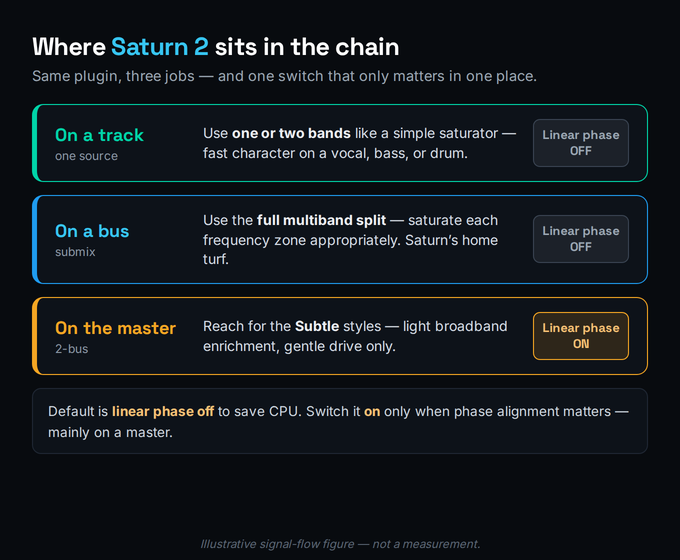
Saturn is comfortable at every stage of a chain, but the right way to use it changes with the position. On an individual track, you’ll often treat it almost like a single-band saturator — one or two bands, a style that suits the source, drive to taste — and that’s fine, though it’s also where a cheaper box might do the job. On a bus or submix, the multiband design starts paying for itself: carve the bands to match the content and saturate each appropriately, the way we described on the drum and instrument buses above. On the master, Saturn becomes a precision tool — the “Subtle” styles exist specifically for the light, broadband enrichment a master can take, and this is the one place the linear-phase option matters.
Here’s the linear-phase note in plain terms. Saturn’s crossovers, like any filter, introduce phase shift, and on most sources that phase shift is inaudible and harmless. On a full master, where stereo coherence and transient integrity are under a microscope, the optional linear-phase processing keeps the bands phase-aligned at the cost of some latency and CPU. The discipline is simple: leave linear phase off by default to save resources, and switch it on when phase actually matters — primarily on a master, or when you hear smearing at the crossovers. To set those crossovers intelligently, it helps to know where your problem frequencies live; our free frequency and EQ reference is a quick way to map them, and the Mix Fingerprint analyzer can show you the spectral balance you’re working against before you start adding harmonics.
One practical workflow tip that saves a lot of grief: set your crossovers before you start driving anything. It’s tempting to crank drive first and chase the sound, but on a multiband saturator the band boundaries shape everything downstream, so define the frequency zones, then saturate within them. Treat the crossovers as the structure and the drive as the paint.
The Honest Catch: Price, Tucked Controls, and Over-Driving Everything
No review is worth reading if it won’t name the weak points, so here they are, plainly. The first is price in context. At $149, Saturn isn’t expensive for a FabFilter plugin, but it’s expensive for a saturator, because the saturation market is genuinely crowded with excellent cheaper options. You’re not paying for better warmth than a $30 box — plenty of cheap saturators sound wonderful — you’re paying for multiband control and modulation. If you won’t use those, the price is impossible to justify, and pretending otherwise would be dishonest.
The second is a pair of real workflow nits that experienced reviewers consistently raise: a couple of the output-stage controls are tucked away where you wouldn’t expect them, and preset browsing is more manual than FabFilter’s otherwise-slick interface would lead you to expect. Neither is a dealbreaker, but in a plugin this polished they stand out, and they’re part of why the workflow score isn’t a perfect ten.
The third catch isn’t Saturn’s fault at all — it’s yours, and mine. Saturn makes saturation so easy and so good that the real risk is over-driving everything. Because per-band drive sounds great, the temptation is to put a little Saturn on every track, and a mix with twenty instances of harmonic generation stacking up gets crowded and fatiguing fast. Convert that risk into a discipline: use Saturn deliberately, on the sources and buses that benefit, with restraint. Reach for a one-knob character box like Decapitator or RC-20 when you want fast, committed colour, and reach for Saturn when you want the surgical, multiband, modulated treatment that nothing else does. The honest weak point of a great tool is the over-use it invites.
The True Cost: $149 in a Crowded Saturation Market
Let’s do the value math properly. Saturn 2 is $149 direct from FabFilter and from Sweetwater and Plugin Boutique, as a one-time perpetual license with free updates within the major version — you own it, nothing gets re-priced into a subscription tier. If you own Saturn 1, the upgrade runs around $65. FabFilter also runs a Summer sale in June or July and a Black Friday sale most years, typically around 25% off, so if you’re reading this near one of those windows, it’s worth checking whether a discount is live before paying full price — we won’t claim one is active unless the store shows it, because sale timing moves.
The reason Value is the honest low score (7.9) isn’t that $149 is unfair — it’s that the saturation market is the most over-supplied category in plugins. Excellent saturation ships free in every modern DAW; superb character boxes sell for $30–$60; and our roundup of the best saturation plugins is full of options that sound fantastic for a fraction of Saturn’s price. Against that backdrop, Saturn has to justify a premium, and it only does so on capability: multiband, modulation, amp-style range, and the cleanest interface in the category. If you’ll use those, $149 is genuinely well spent and you’ll keep it for a decade. If you won’t, you’re buying a Swiss-army saturator to do a job a pocket knife handles — and you’d get more mileage spreading that budget across a couple of focused tools from our best mixing plugins shortlist.
The cleanest way to frame the spend: Saturn is a tool you grow into, not a quick-win purchase. A producer who already thinks in frequency bands and reaches for modulation will feel the $149 disappear within a week. A producer who mostly wants to make a vocal a bit warmer will wonder where the magic is, because the magic is in the control they’re not yet using. Buy it for the workflow you actually have, not the one you imagine you’ll grow into next year.
Saturn vs Decapitator vs RC-20 vs Stock
The decision almost always comes down to Saturn against the saturators you might already own, so here’s the honest fork. Soundtoys Decapitator is the king of one-knob analog character — you turn it up, it sounds great, and it’s faster and more immediately musical than Saturn on a single source; our Decapitator review covers exactly where it wins. XLN Audio RC-20 Retro Color is the lo-fi, vibe, and texture box — wow, flutter, noise, and character that Saturn doesn’t try to do; the RC-20 review lays out that niche. And stock saturation — the saturator already in your DAW — is genuinely good enough for a huge amount of everyday warmth, and free.
| Tool | Best at | Reach for it when | Price |
|---|---|---|---|
| Saturn 2 | Surgical multiband, modulation, amp range | You want per-band drive on a bus or master, or moving texture | $149 |
| Decapitator | Fast one-knob analog character | You want committed colour on a single source, instantly | ~$99 |
| RC-20 Retro Color | Lo-fi, wow/flutter, vibe, noise | You want texture and age, not clean harmonics | ~$99 |
| Stock saturation | Everyday warmth, free | You just need a little single-band warmth and own nothing | $0 |
So the genuinely honest recommendation is the unglamorous one: these aren’t really competitors, they’re different tools, and a well-equipped producer ends up owning more than one. If you have none of them and want a single saturator to do everything, Saturn’s breadth makes it the most defensible one-purchase — but you’ll pay $149 and use a quarter of it at first. If you already own a character box and stock saturation, the question isn’t “which is best,” it’s “do I have a multiband-and-modulation-shaped hole in my chain?” If yes, Saturn fills it better than anything. If no, your money is better spent elsewhere, and Saturn can wait until the need is real.
Who Should Buy It, Who Should Skip It
Buy Saturn 2 if you do any real bus or mastering work and want saturation you can apply per frequency band — that capability is its reason to exist and nothing else does it as cleanly. Buy it if movement and modulated texture are part of your sound, because the modulation engine is a genuine differentiator. Buy it if you want one high-quality saturator that can credibly cover warmth, glue, grit, amp-style distortion, and creative FX, and you’ll grow into the depth. And buy it if you’re already inside the FabFilter ecosystem and value that consistent, legible interface across your whole chain.
Skip it — for now — if your saturation lives almost entirely on single mono sources, where a character box gives you more personality faster. Skip it if you only ever want one-knob warmth, because stock plus a cheap saturator covers that and the premium buys you nothing you’ll touch. And skip it if you’re early enough in your journey that a crowded chain is more of a risk than a missing feature — the producer who hasn’t yet learned restraint with saturation is exactly the one who’ll over-drive everything with a tool this easy to enjoy. None of that is a knock on Saturn. It’s the difference between the best tool and the right tool, and only your sessions can tell you which this is for you.
Try It Yourself (Free Trial)
FabFilter offers a free trial of Saturn 2, and the fastest way to know whether the multiband control is worth $149 to you is to run these three jobs in order — they move from “does it sound good” to “do I actually use what makes it special.” If you want a spectral reference while you set crossovers, keep the free frequency and EQ reference open alongside.
- Insert the trial on a single source — a bass, a vocal, or a synth — and pick a Subtle Tube style with one band only.
- Bring the drive up slowly until you hear warmth and presence appear, then back it off until it’s barely obvious.
- Bypass and compare. Note honestly whether a cheaper one-knob saturator would have given you the same result faster — this is the test of whether you need multiband at all.
- Put Saturn on a full drum bus or instrument bus and split it into three bands using the crossovers before touching drive.
- Drive the low band for weight, add a warm Tube to the mids, and leave the highs nearly clean — the per-band move this plugin exists for.
- Toggle the whole plugin and listen for the result you can’t get from a single-band box: bigger lows and clearer highs at the same time.
- On a band that carries rhythmic energy, connect an envelope follower to that band’s drive so the grit intensifies on hits.
- Add an XLFO sweeping a crossover or a band’s tone for slow evolving movement, and watch the real-time modulation visualization to see what’s happening.
- Render a loop and ask the only question that matters: would a static saturator have given you this much life? If yes, you don’t need Saturn. If no, you just found the $149.
The Verdict
FabFilter Saturn 2 is the best multiband saturator a producer can buy in 2026 — clean, deep, beautifully built, and capable of saturation moves nothing else in the category can match. At 8.8 it earns a clear recommendation, but a conditional one, and the condition is the whole point: Saturn is worth its $149 in direct proportion to how much of its multiband, modulation, and amp-style range you’ll actually use. Use those and it’s a desert-island plugin you’ll keep for a decade. Ignore them and you’ve bought a precision instrument to do a job a cheap box does just as well. Buy it for the control, not the warmth — the warmth is everywhere; the control is what makes Saturn special.