Most FabFilter Pro-C 3 reviews will do the same thing: count the new compression styles, screenshot the Character panel, repeat the word “musical,” and hand out five stars next to an affiliate button. None of that answers the question you actually arrived with. You can read a feature list on FabFilter’s own page. What you need to know is narrower and harder: Pro-C 2 has been a reference-grade compressor for over a decade and it still is — so what, exactly, does Pro-C 3 do that justifies either the $199 or the upgrade, and for whom?
Here is the honest version first. Pro-C 2 was a clean, surgical precision tool: arguably the best transparent compressor in software, with the clearest gain-reduction display in the business and nothing essential missing. Pro-C 3 doesn’t replace that tool — it keeps every one of its eight styles — and then bolts on the one thing Pro-C 2 deliberately never had: character. Three flavours of analog saturation, six new program-dependent styles including opto and variable-mu models, a deeper detector section, and full Dolby Atmos. If you only ever reached for Pro-C 2 in Clean or Transparent mode, most of that is “nice, not necessary.” If you regularly left FabFilter to add colour with a separate plugin, Pro-C 3 may have just collapsed two tools into one. That split — not the spec sheet — is the whole review.
How we approached this. Every price, version, format, and feature claim here was re-verified against FabFilter’s live materials and several independent launch reviews this session, not older write-ups. This is a reasoning-and-documentation review, not a first-party measured bench: we did not run a controlled null test or CPU benchmark in our own room, so every judgement about how Pro-C 3 sounds is framed as reasoning from documented behaviour and the consensus of engineers using it daily — never a fabricated “we measured the THD” claim, and the diagrams below are labelled illustrative for the same reason. Where a number can move — the price especially, since FabFilter and resellers run sales — we tell you to confirm it live. Let’s get into it.
FabFilter Pro-C 3 is the most complete software compressor FabFilter has ever shipped — the same legendary precision and visual feedback, now with fourteen styles, a genuine analog Character panel (Tube/Diode/Bright), a six-band side-chain EQ, Host-Sync ducking, and Dolby Atmos up to 9.1.6. Buy it fresh ($199) if you don’t already own Pro-C 2 — it’s clear flagship value and there’s little aged competition at this level. Upgrade (~$82) if you’ve been leaving Pro-C 2 to add colour, vintage behaviour, or immersive support elsewhere. Stay on Pro-C 2 if you only ever use it clean — nothing essential is missing, and the upgrade is a strong “nice,” not a “need.” The honest catch is the value math for existing owners, not the plugin: Pro-C 3 is excellent; whether you need it depends entirely on whether you use what’s new.
The Verdict
FabFilter’s cleanest compressor finally grew character — a clear buy for new owners, a strong-but-optional upgrade if you only ever ran it transparent.
| Sound & algorithm quality | 9.4 | |
| New character & colour | 9.1 | |
| Workflow & interface | 9.2 | |
| Side-chain & control depth | 9.0 | |
| Immersive / Atmos support | 8.7 | |
| Value vs Pro-C 2 (upgrade math) | 7.8 | |
| Who it’s for (clarity of fit) | 8.8 |
That 8.9 is a defended judgement, not an average of the rows, and the spread is the argument. Sound & algorithm quality (9.4) is where Pro-C 3 leads outright: the underlying detection is the same world-class engine that made Pro-C 2 a default, now with more knee range and lookahead to play with. Workflow (9.2) stays near the top because nothing shows you compression as legibly as FabFilter’s animated curve. New character & colour (9.1) is the genuine leap — the Character panel and the opto/Vari-Mu styles finally answer the one criticism Pro-C 2 always drew. Side-chain & control depth (9.0) reflects the jump from three to six EQ bands plus Host-Sync and Auto Threshold. Immersive (8.7) is strong but niche — superb if you mix Atmos, irrelevant if you don’t. The number that pulls the overall down is Value vs Pro-C 2 (7.8), and it is deliberately the honest axis: if you only ever ran Pro-C 2 clean, you are being asked to pay for colour you may never use. Every one of these numbers is defended in the sections below.
What FabFilter Pro-C 3 Actually Is
Get the category right first. Pro-C 3 is a full-range dynamics compressor for mixing and mastering — the latest version of the plugin that, since 2015, has been one of the two or three most-recommended software compressors on the planet. If you’re still fuzzy on what the tool does at all, our primer on what a compressor is actually used for is the right starting point, and the underlying concepts of threshold, ratio, and attack and release are worth having straight before you spend money on any compressor, FabFilter or otherwise.
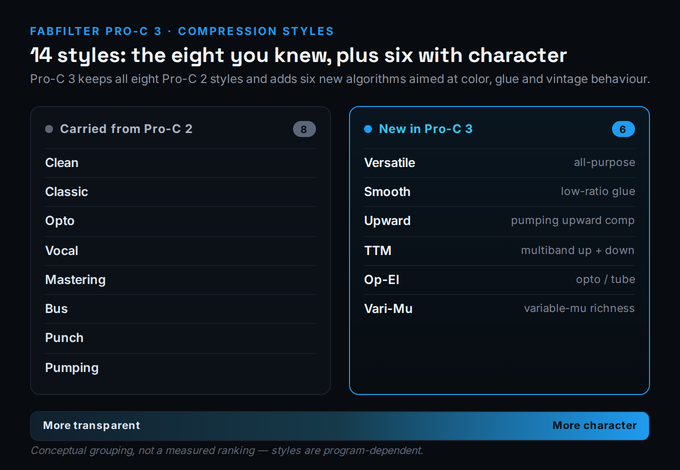
The headline change is the style count. Pro-C 3 ships fourteen program-dependent compression styles: the eight carried over from Pro-C 2 — Clean, Classic, Opto, Vocal, Mastering, Bus, Punch, and Pumping — plus six brand-new algorithms: Versatile (a general-purpose model), Smooth (low-ratio glue with longer envelopes), Upward (pumping upward compression), TTM (combined downward and upward across multiple bands), Op-El (opto/tube behaviour), and Vari-Mu (variable-mu richness inspired by classic tube hardware). A “style” in Pro-C is not a preset; it’s a different underlying envelope and topology, which is why the choice matters more than any knob you’ll turn afterwards.
Mechanically, nothing about the workflow will surprise a Pro-C 2 user: you insert it on a track, bus, or master; the animated display shows gain reduction, attack, release, and knee shape in real time; you pick a style, set threshold and ratio, and let the program-dependent timing do the rest. What’s genuinely new lives in two places — the detector path got deeper, and a Character panel got bolted to the output. It also now plugs into the same Pro-Q 4 Instance List as Pro-G and Pro-DS via the free Pro-Q 4.10 update, turning a set of FabFilter plugins into a multi-track channel-strip overview. That cross-plugin convenience costing nothing extra is worth saying plainly: the Instance List is a free update, not a Pro-C 3 paywall.
What hasn’t changed is the thing that made Pro-C a default in the first place, and it’s worth dwelling on because it’s half of why the Sound and Workflow scores sit so high. Pro-C’s animated gain-reduction display is still the clearest in the category: you can see the attack catch a transient, watch the release let go, and read the knee’s softness as a curve rather than guess at it from a number. For anyone still building an intuition for compression, that visual feedback is genuinely educational — it turns abstract settings into something you can watch behave. Most compressors ask you to trust your ears alone; Pro-C lets your eyes confirm what your ears suspect, and on a long mixing day that shortens the loop between “something’s wrong” and “here’s why.” Pro-C 3 keeps every bit of that and adds more knee range and lookahead to look at, so the display now shows you slightly more of the picture. None of this is new-to-3, but it’s the foundation the new features are built on, and it’s why even the parts of Pro-C 3 that overlap entirely with Pro-C 2 still feel best-in-class.
The Real Question: Who Actually Needed Character?
Here is the thesis the marketing buries under the style count, and it’s the single most useful way to decide whether this is your upgrade. For a decade, the one consistent criticism of Pro-C 2 — from people who loved it — was that it had no character. It was clean to a fault. Engineers who wanted analog grit, tube warmth, or the slow, forgiving squash of a vari-mu would compress with Pro-C 2 for control and then add colour with a second plugin: a 1176 emulation, a tube saturator, an opto box. Pro-C 2 was the surgeon; something else was the personality.
Pro-C 3 is FabFilter’s answer to exactly that workflow. The six new styles and the Character panel are an attempt to put the colour inside the compressor, so the surgeon and the personality become one plugin. Whether that matters to you is a clean, honest test: open your last ten mixes and look at what sits next to your compressors. If there’s consistently a saturator or a vintage-modelled comp right after Pro-C 2, Pro-C 3 may genuinely fold two inserts into one. If Pro-C 2 always sat alone in Clean mode and you never missed anything, the new character is a feature you’ll admire and rarely engage — which is precisely why the Value axis above sits where it does.
The styles map below is the cleanest way to see what changed. The eight on the left are exactly what you already know; the six on the right are the new territory, and they cluster toward the “character” end of the spectrum that Pro-C 2 never reached.
The Character Panel: FabFilter’s First Real Colour
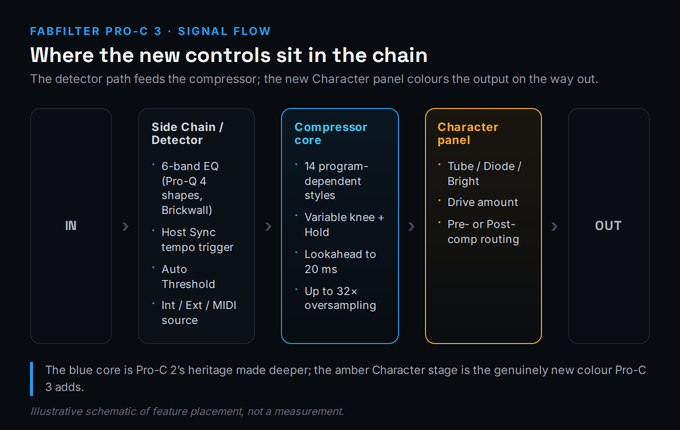
The Character panel is the feature that will sell Pro-C 3 to most upgraders, so it deserves a careful, honest look. It adds three flavours of analog saturation — Tube, Diode, and Bright — with a single Drive amount and, crucially, a routing switch that places the colour either before or after the compression stage. Pre-compression, the saturation feeds the detector and gets squashed along with the signal, giving you grit that the compressor then tames; post-compression, the colour sits on top of an already-controlled signal, which is the cleaner, more mastering-friendly option. That pre/post choice is small in the UI and large in practice.
What the Character panel is not is a replacement for a dedicated saturator like FabFilter’s own Saturn 2. Saturn is multiband, has twenty-eight distortion models and a deep modulation system, and exists to make saturation a per-frequency-band decision. Pro-C 3’s Character is broadband, three-flavour, one-knob colour designed to live with the compression, not to be a sound-design tool in its own right. That’s the right scope — it should add warmth and harmonic interest to a compressed signal, and it does that well — but if your goal is aggressive, sculpted distortion, you still want a real saturator. Reviewers consistently describe the Character models as convincing rather than extreme, which matches the design intent.
The three flavours are worth distinguishing, because reaching for the right one is most of the skill. Tube is the warm, even-harmonic option — the one you’ll default to on bass, vocals, and anything that wants weight and a softened top without obvious distortion. Diode is grittier and more aggressive, generating denser harmonics that suit drums, parallel-crushed rooms, and sources you want to push forward with attitude rather than polish. Bright does what the name says: it emphasises upper harmonics to add air and presence, which is the flavour for dull sources or for lifting a vocal’s sheen without an EQ boost. Used at low Drive with post-compression routing, all three behave as subtle finishing colour; pushed harder, pre-compression, they become an effect the compressor then has to wrangle. The practical takeaway is that Character isn’t one sound with a volume knob — it’s three distinct tools, and matching flavour to source is the difference between “tasteful warmth” and “why does this sound worse.”
Where this earns its keep is on the sources that always wanted both control and colour at once: bass that needs to be both even and thick, drum buses that want glue and grit, lead vocals that need to sit forward with a little tube weight. The moves you already know from our guide to compressing vocals and drum compression guide don’t change — you’re still setting makeup gain to match levels and using your ears on the gain-reduction meter — but now the warmth those guides used to send you to a second plugin for is one panel away. On vocals especially, pairing the carried-over Vocal style or the new Op-El with a touch of Tube covers ground our fuller vocal compression guide previously needed a separate saturator to reach.
The diagram below shows where the new pieces actually sit in the signal. The detector path on the left decides when to compress; the core in the middle is Pro-C 2’s heritage made deeper; the Character stage on the right is the genuinely new colour, with its pre/post routing determining whether it’s feeding the compressor or sitting on the output.
Side Chain, Host Sync, and Auto Threshold: The Quiet Upgrades
The features that won’t make the marketing headline are the ones working engineers will use every day. The biggest is the side-chain EQ, which expands from three bands to six and now offers every filter shape from Pro-Q 4, including Brickwall low-pass and high-pass slopes, with each band switchable to mid or side. That turns the detector into a precision instrument: you can make the compressor ignore sub-bass entirely, react only to a vocal’s sibilance range, or duck only the side signal while the centre stays put. Anyone who has wrestled a kick and bass into coexistence will recognise immediately what six bands of detector EQ buys you, and our sidechain compression guide covers the moves this makes newly possible.
Then there’s Host Sync, a new trigger source that outputs a steady tempo-locked pulse so the compressor can pump rhythmically without an external trigger track — ideal for the classic dance-music ducking effect that previously needed a routed sidechain or a dedicated plugin. And Auto Threshold, which dynamically shifts the threshold so the same amount of gain reduction is applied regardless of input level — genuinely useful on dialogue or any source whose level wanders, where you want consistent dynamic styling without riding the threshold by hand. Add intelligent Auto Gain and Auto Release, an adjustable lookahead up to 20 ms, a knee that runs from hard to a 72 dB soft curve, hold up to 500 ms, and up to 32× oversampling, and the control surface is meaningfully deeper than Pro-C 2’s.
It’s worth being concrete about what “program-dependent” timing actually buys you, since it’s the quiet engine behind half of Pro-C’s reputation. Auto Release doesn’t just pick one release time and hold it — it continuously adapts the release to the material, letting go faster on sparse passages and holding longer through dense ones, which is what keeps the compression from pumping audibly on a track whose density changes verse to chorus. The fourteen styles each pair this with their own attack and detector behaviour, so choosing a style is really choosing a whole timing philosophy before you touch a knob. This is why the advice in our bus compression guide leans so hard on style choice: on a full mix bus, the difference between Bus and Smooth isn’t cosmetic, it’s the difference between glue that breathes and glue that grabs. Pro-C 3’s six new styles widen that menu rather than replacing it, and getting fluent in which style for which job will improve your results far more than any single parameter you can automate.
None of these alone is a reason to upgrade, but collectively they answer the “is this just a saturation panel bolted on?” question with a clear no. If you want to dial these settings in by feel before committing, our free gain-reduction calculator and attack and release calculator are useful companions for translating what you hear into starting numbers, and the broader theory of an optical compressor is worth reading before you lean on the new Op-El style.
Immersive Audio: Atmos Up to 9.1.6
Pro-C 3 adds full Dolby Atmos and surround support up to 9.1.6, with channel and stereo linking that adapts automatically to the layout it’s placed in. For the growing number of engineers delivering immersive mixes — film, games, Apple Music spatial — a compressor that handles a 9.1.6 bed natively, rather than forcing per-channel instances, is a real workflow win, and it’s the kind of capability that quietly makes a plugin a long-term default. For everyone mixing in stereo, this feature is simply not relevant, which is exactly why it scores well on its own terms (8.7) but doesn’t move the overall verdict much: it’s excellent for the people who need it and invisible to those who don’t. If immersive work is on your horizon, it’s a meaningful tick in Pro-C 3’s column over the still-stereo-focused Pro-C 2; if it isn’t, treat this paragraph as information, not a reason to spend. Worth noting too: immersive support is the kind of feature that ages well — spatial delivery is expanding across streaming and film, so a compressor that already handles a 9.1.6 bed is quietly future-proofing a chain you’ll keep for years, even if you don’t need it the day you buy.
Pro-C 2 vs Pro-C 3: The Upgrade Math, Honestly
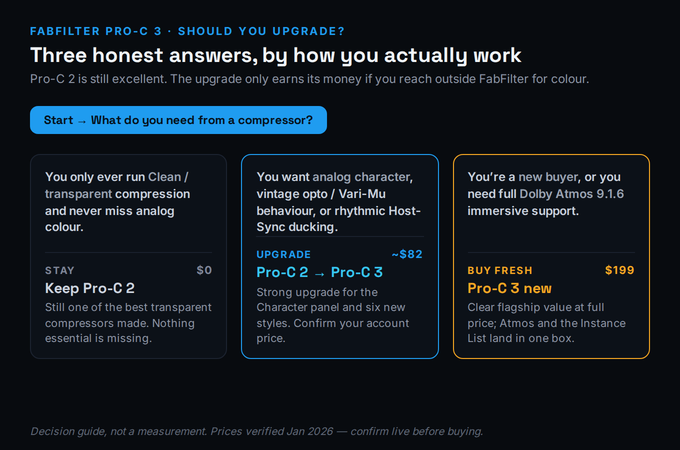
This is the section affiliate-driven reviews skip, so it’s the one we’ll spend the most care on. The upgrade from Pro-C 2 is around $82 (FabFilter shows a personalised price in your account based on what you already own; resellers list roughly £72–£74 / €84). For that, you get the Character panel, six new styles, the six-band detector EQ, Host Sync, Auto Threshold, the deeper knee and lookahead, Atmos, and the Instance List hook. That is a lot of plugin for the money on paper. The honest question is whether your work touches any of it.
Be ruthless with yourself here, because this is where money gets wasted. If you bought Pro-C 2 to be a transparent, invisible level-controller — the “set it and forget it” compressor that just makes things even — and that is genuinely all you ask of it, then Pro-C 3 changes very little about your day. You’ll get the same transparent result from the same engine, plus features you’ll admire in the manual and rarely open. There is no shame in that verdict, and it’s the one a lot of reviews are too commercially motivated to say out loud: a strong, well-priced upgrade is still the wrong purchase if you won’t use what it adds.
Conversely, if you’ve been running Pro-C 2 and then reaching for a 1176, an opto, or a saturator to add the warmth FabFilter never built in, the upgrade is close to a no-brainer: you’re paying $82 to delete a plugin from your chain and gain a deeper detector at the same time. And if you do any immersive work, the Atmos support alone may justify it. The decision genuinely forks three ways, and it’s cleaner to see it than to read it:
Price, Formats, and Where to Buy
As of the January 2026 launch, Pro-C 3 is $199 USD / €169 / £149 including VAT for a perpetual desktop licence, with the upgrade from Pro-C 2 around $82 (personalised in your FabFilter account). There’s also an iPad/iOS AUv3 version at $29.99 on the App Store, usable in hosts like AUM, Cubasis, Auria, and GarageBand — though note the cross-plugin Instance List is desktop-only for now. Desktop formats cover VST, VST3, AU, CLAP, AAX Native, and AudioSuite (64- and 32-bit), so it runs in essentially every major DAW — Logic, Ableton Live, FL Studio, Cubase, Pro Tools, Reaper, Bitwig. It’s sold direct from FabFilter and through Plugin Boutique, where a free trial is available.
Two honesty notes on price. First, confirm the live figure before you buy — FabFilter and resellers run sales a few times a year, and launch pricing shifts; treat the numbers here as a January 2026 snapshot, not a guarantee. Second, you may have seen the older figure of $179 floating around (including, until this update, in our own Pro-C 2 article): that was an early, unverified estimate. The verified launch price is $199. We mention it because getting a price wrong is exactly the kind of small error that erodes trust, and we’d rather flag our own correction than bury it.
Where Pro-C 3 Sits in Your Chain
Pro-C 3 is a generalist done exceptionally well, which means its competition is partly its own predecessor and partly the cheaper, more characterful boxes you may already own. Against Pro-C 2, the story is the upgrade math above. Against the wider field, it lands in our best compressor plugins roundup near the top for transparent and all-purpose work, while dedicated vintage emulations still win when you specifically want the idiosyncratic colour of one famous unit. Pro-C 3’s Character panel narrows that gap considerably, but a true 1176 or LA-2A emulation will still out-character it on the sources that want exactly that flavour.
There’s a more uncomfortable comparison worth making, because it’s the one a $199 plugin’s own marketing will never raise: your DAW’s stock compressor. The built-in compressors in Logic, Live, Cubase, and Studio One have all become genuinely good, and for a beginner learning the fundamentals of what a compressor does, they are completely sufficient — you do not need to spend money to learn compression, and anyone who tells you otherwise is selling something. What Pro-C 3 buys over stock is not “better compression” in some absolute sense; it’s the world-class visual feedback, the depth of the detector and side-chain, the breadth of styles, the analog colour, and the immersive support — a workflow and a ceiling, not a magic sound. If you’re early enough that you’re still unsure whether your compression is helping or hurting, spend the $199 later and the free trial now; learn the craft on what you already own first. If you’ve outgrown your stock compressor and know exactly which of Pro-C 3’s capabilities you’re reaching for, that’s precisely when it stops being an expense and starts being a tool that pays for itself.
In a FabFilter-centric chain it’s a natural fit alongside Pro-Q 4 and, for anything that wants real multiband saturation, Saturn 2 — the Instance List makes managing them together genuinely pleasant. For the techniques Pro-C 3 enables, our guides to bus compression and parallel compression both apply directly — and our parallel processing calculator takes the guesswork out of the blend — while the new TTM and Upward styles open doors that a single downward compressor can’t. If you’re assembling a plugin set from scratch in 2026, Pro-C 3 belongs in the conversation in our best plugins for mixing guide — not because it’s the only good compressor, but because it’s the one that now does the most jobs well from a single insert.
Try It Yourself: Three Tests Before You Buy
FabFilter offers a free trial, and the fastest way to know whether Pro-C 3’s new features are worth real money to you is to run these three jobs in order — they move from “does the engine still sound great” to “do I actually use what’s new.” Keep the gain-reduction calculator open if you want a numeric reference while you set threshold and ratio.
- Insert the trial on a vocal or bass, choose the Clean or Versatile style, and set a gentle 2:1–3:1 ratio with the threshold catching the loudest phrases.
- Watch the animated gain-reduction display and aim for 3–5 dB of reduction on peaks — the core Pro-C engine doing exactly what Pro-C 2 always did.
- Bypass and compare. If this is genuinely all you ever need a compressor to do, note that honestly — it’s the test of whether Pro-C 2 already covers you.
- On a bass or drum bus, set up your usual compression, then open the Character panel and try Tube with a moderate Drive.
- Switch the routing from post- to pre-compression and listen to the difference: pre feeds grit into the detector, post lays warmth over the controlled signal.
- Now bypass only the Character panel. Ask the decisive question: would you previously have added a separate saturator here? If yes, Pro-C 3 just replaced it.
- On a busy bus, open the six-band side-chain EQ and high-pass the detector so the compressor stops reacting to sub energy, then notch the band that’s over-triggering.
- On a separate pad or bass, switch the trigger source to Host Sync and dial a tempo-locked pulse for rhythmic ducking with no external routing.
- Render both and decide: did the six-band detector and Host-Sync solve problems your old workflow needed extra plugins or routing for? If yes, you’ve found the upgrade money.