Buy the Focusrite Scarlett 2i2 4th Gen (~$199) if this is your first interface and you record one mic or one guitar at a time: it is cheaper, forgiving (Air, Auto Gain, Clip Safe), and the software bundle alone is worth real money to a beginner. Buy the MOTU M4 (~$279) if you can already name a second source you will plug in — a synth, a drum machine, a second pair of monitors — or you want MIDI, a hardware loopback mix for streaming, or simply not to outgrow the box in a year. The two sound close enough that fidelity is not the deciding factor. The real question is whether you want the cheapest capable interface today, or the one you grow into. Here is exactly how to tell which one you are.
This article contains affiliate links. If you purchase through our links, we may earn a commission at no extra cost to you. This does not affect our editorial independence — every recommendation here is based on genuine, source-checked assessment.
| Axis | MOTU M4 | Scarlett 2i2 4th Gen |
|---|---|---|
| Sound & converters | 9.0 | 8.8 |
| Preamps (gain, Air, ease) | 8.6 | 8.9 |
| I/O & expandability | 9.2 | 8.0 |
| Loopback & streaming workflow | 9.0 | 8.5 |
| Software bundle value | 7.8 | 9.3 |
| Build & portability | 8.8 | 8.9 |
| Value for money | 8.7 | 8.9 |
| Overall | 8.7 | 8.8 |
Scores are MPW editorial judgement, defended axis by axis below — a decision framework, not a first-party measurement. Specs and prices were re-verified on June 23, 2026 against MOTU's and Focusrite's current product pages plus 2025–26 reviews. Prices are USD street and move constantly; confirm at the vendor before you buy.
Updated June 2026 — MOTU M4 vs Scarlett 2i2 4th Gen
The overall scores land a tenth of a point apart, and that is the honest result: neither of these is the "better interface" in the abstract. The MOTU M4 wins the axes that decide how far the box takes you — I/O and expandability (9.2) and loopback workflow (9.0). The Scarlett 2i2 4th Gen wins the axes that decide how cheaply and easily you start — bundle value (9.3) and preamp ease (8.9). Ignore the overall number; find the row that matches what you are actually going to do, and that row is your answer. Everything below defends those numbers.
Same Money, Very Different Ambitions
The first thing to fix is the matchup itself, because most of the internet gets it wrong. Search "MOTU vs Scarlett" and you will find page after page comparing the MOTU M2 against the 2i2 — two 2-in/2-out boxes at roughly the same price, decided on the tired cliché of "clinical MOTU versus musical Focusrite Air." That comparison is real, but it is not this one. The M4 is a different animal: it is the M2's bigger sibling, a 4-in/4-out interface that MOTU prices only a little above the 2-channel 2i2. Comparing the M4 to the 2i2 is not comparing two equals; it is asking whether you would rather pay about $80 more for roughly twice the interface, or keep the $80 and take a much larger software bundle instead.
That framing changes everything. The 2i2 is a finished idea: two excellent preamps, the cleanest the Scarlett line has ever shipped, wrapped in the most beginner-friendly feature set on the market. It does one thing — record one or two sources beautifully — and it does not pretend to do more. If your needs are genuinely that simple, the 2i2's focus is a feature, not a limitation, and our full Scarlett 2i2 4th Gen review covers just how polished that core experience is.
The M4 is an open-ended idea. Its two extra line inputs, RCA outputs, MIDI ports and monitor-mix dial are not there to win a single recording session; they are there for the session you will run in eighteen months, when you have added a synth, a drum machine or a second pair of monitors. The MOTU M4 review goes deep on that hardware, but the short version is that you are buying headroom — not sonic headroom, but capability headroom. The interesting question is not which is better. It is whether you are the kind of producer who will use that capability, or the kind who will not.
It helps to know who is behind each box, because the two companies optimise for different buyers. Focusrite has spent more than a decade making the Scarlett the default first interface — it is among the best-selling interface lines in the world, and the 4th Gen distils that experience into a unit engineered so a first-timer struggles to get a bad take. MOTU comes from the professional and MIDI world, and the M-series brings pro-grade converters and connectivity down to an entry price, but it assumes a little more from you in return. Neither approach is better, yet they tell you who each was designed to please: the Scarlett wants to be your first interface, the M4 wants to be your last cheap one.
One honest caveat before we go further: if your real situation is "I record exactly one thing and I always will," then even the 2i2 may be more than you need, and the Scarlett Solo versus 2i2 question is the one to settle first. This article assumes you want stereo recording and room to grow at least a little — the band where the M4-versus-2i2 decision actually lives. With that settled, let us go axis by axis.
Sound: Converters, Preamps & the Air Question
Start with the good news: you cannot make a bad-sounding choice here. Both interfaces convert at 24-bit/192 kHz, both quote a 120 dB dynamic range, and both will out-resolve your room, your monitors and your ears for years. Anyone telling you one of these is "night and day" cleaner than the other is selling something. The differences are real but small, and they live at the edges — in the noise floor, in the character of the preamps, and in the features wrapped around them.
One number you can stop worrying about is sample rate. Both interfaces record at up to 24-bit and 192 kHz, which is more than any home recording needs; tracking at 44.1 or 48 kHz is the sane default and leaves both with identical headroom. The 120 dB dynamic range figure they each quote describes the span between the noise floor and the loudest undistorted signal, and at this level it means the converters are not your limiting factor — your room, your mic and your monitoring are. Spend the energy you might waste comparing converter spec sheets on those instead; it will move your recordings far more than the fractional differences here.
The M4 leans on ESS Sabre32 converters, the same family MOTU uses in far pricier interfaces, and its mic preamps are specified at a very low −129 dB EIN. In practice, reviewers most often single out the M4 for a slightly lower noise floor — the kind of margin you only notice on a quiet, high-gain source like a ribbon mic or a dynamic mic that needs a lot of gain, where every dB of self-noise matters. If you plan to track a quiet vocal close-up or an acoustic guitar in a quiet room, that margin is a genuine, if subtle, point in the M4's favour. For a primer on why preamp self-noise matters, our Bible entry on the preamp explains it without the marketing.
The 2i2 answers on usability rather than raw numbers. Its 4th-Gen preamps offer a big 69 dB of clean gain — more than the M4 — which makes high-gain dynamics like the SM7B easy without an inline booster. On top of that sit two features the M4 simply does not have: Auto Gain, which sets a sensible level for you from a test phrase, and Clip Safe, which rides the gain down if you are about to clip. For a first-timer who does not yet trust their gain staging, those are not gimmicks; they are the difference between a usable take and a ruined one.
What does this mean at the desk? For a spoken-word podcast or a loud source like an electric guitar amp, the two are effectively indistinguishable — both capture a clean, detailed signal with headroom to spare. The differences only surface at the extremes: a quiet acoustic fingerpicked softly, a ribbon mic, or a vocal recorded a foot back all push you into high gain, and that is where the M4's lower noise floor earns its half-point. A beginner chasing a bright, finished-sounding vocal, meanwhile, will reach for the 2i2's Air and Auto Gain and get there faster. Pick the box whose easy path matches the recording you actually make most often, not the one that wins a spec you will never stress.
Then there is Air. Focusrite's Air mode adds a Presence boost and a harmonic drive modelled on its classic ISA console, and it genuinely flatters vocals and acoustic guitars. The MOTU's philosophy is the opposite — it aims to be transparent and get out of the way. Neither is "better"; they are different defaults. If you want a sound that leans bright and forward out of the box, the 2i2's Air is a real draw. If you would rather capture a neutral signal and shape it in the mix, the M4's clean slate suits you. On the scorecard the converters edge to the M4 (9.0 to 8.8) and the preamp experience edges to the 2i2 (8.9 to 8.6) — a wash you should not let decide your purchase. The features around the preamps matter more than the preamps, and that is where the gap opens up. For where both land among cheap interfaces generally, see our best audio interfaces under $200 roundup.
I/O & the Real Question: Will You Outgrow It?
This is the axis the whole comparison turns on, and the one the spec-table sites mention but never actually weigh. On paper the 2i2 is 2-in/2-out and the M4 is 4-in/4-out. In practice that understates the gap, because it is not just two more inputs — it is two more line inputs (channels 3 and 4) that take the line-level outputs of a synth, a drum machine, a hardware mixer or an external preamp, plus a set of RCA outputs for a second pair of speakers or a DJ mixer, plus MIDI in and out, plus a monitor-mix dial and a second headphone output. The M4 is, functionally, close to a 4i4 wearing a 2i2's price tag.
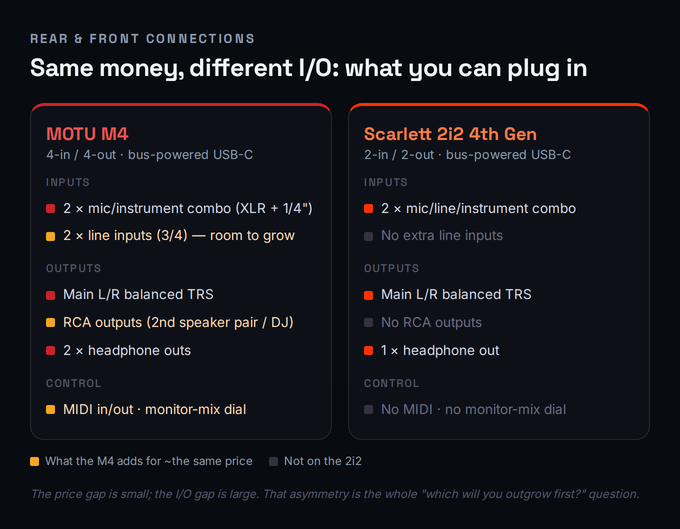
Why does this matter so much for a first interface? Because the most common upgrade story in home recording is not "I needed better sound" — it is "I ran out of inputs." You buy a 2-channel interface, you are happy for a year, and then you get a synth, or a friend wants to track guitar and vocals at once, or you add a hardware drum machine, and suddenly your 2-in box is the bottleneck. At that point you either sell it at a loss and re-buy, or you start the awkward dance of running a second interface. The M4's extra I/O is insurance against exactly that, and at roughly $80 it is cheap insurance.
Two of the M4's smaller features punch above their weight here. The monitor-mix dial blends your live input against playback in hardware, so a guest can hear themselves and the backing track with no software round-trip — invaluable when you are tracking a vocalist who needs to feel the mix. And the second headphone output means you and that guest can both monitor at once, each at your own volume, which the single-headphone 2i2 cannot do. If you ever record another person, those two features turn the session from awkward to easy, and they are exactly the kind of capability you do not know you needed until you are mid-take without it.
The MIDI ports deserve a specific mention because the 2i2 4th Gen has none. If you own a hardware synth, a groovebox or an older MIDI keyboard without USB, the 2i2 cannot connect it without a separate MIDI interface, while the M4 just has the ports. Many modern controllers are USB and sidestep this entirely, so check your own gear — but if you are even slightly hardware-curious, the absence is a real constraint, and it is the single most common reason buyers step up to the Scarlett 4i4 instead of the 2i2; the full Scarlett 4i4 4th Gen review covers that box in depth.
None of this means the 2i2 is wrong. If you have genuinely thought about it and you record one source, or two sources that are both microphones, the M4's line inputs and MIDI are dead weight you are paying to carry. The honest test is simple: can you name the third and fourth thing you would plug in? If you can — a synth, a second mic for stereo, a drum machine, a turntable — the M4 is the better buy and it scores 9.2 here to the 2i2's 8.0. If you cannot, the 2i2's focus is a virtue and the extra I/O is a tax. Our audio interface buying guide has a longer checklist for pinning down your real channel count before you spend.
Loopback & the Streaming/Podcast Workflow
Here is the claim you will see repeated across the SERP that is simply out of date: that only one of these interfaces "really" does loopback. Both do. Loopback — the ability to route your computer's own audio back in so you can record or stream it alongside your mic — is now standard on both boxes. What differs is how each one does it, and that difference quietly decides which is better for your specific workflow.
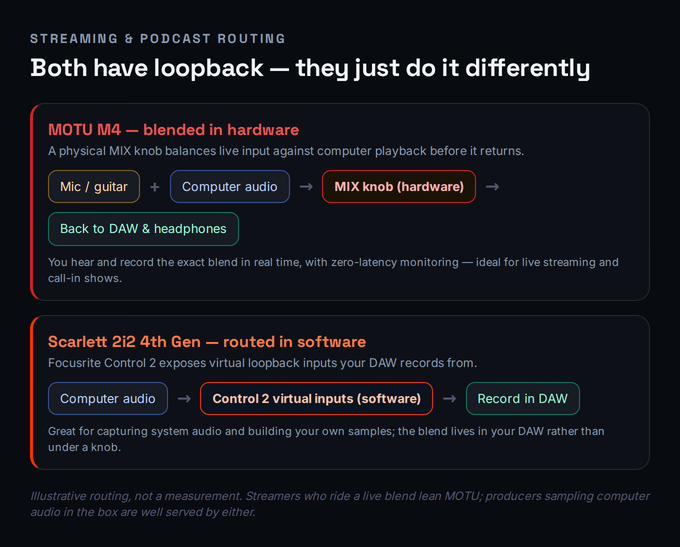
The MOTU M4 does loopback in hardware. Its driver provides loopback channels, and crucially the front panel has a MIX knob that balances your live input against the computer's playback before the blend returns to your software. That means you can sit on a stream, ride the balance between your microphone and the game, music or call audio with a physical control, and monitor the exact blend your audience hears with zero latency. For live streaming, Twitch, or a call-in podcast where sources are constantly being mixed on the fly, that tactile, real-time control is genuinely the better tool, and it is why MOTU explicitly markets the M-series for streaming.
The Scarlett 2i2 4th Gen does loopback in software, through Focusrite Control 2. The app exposes virtual loopback inputs, and your DAW or streaming software records from them. It works perfectly well — it is excellent for capturing system audio to build your own samples, or grabbing a clip from a video — but the blending happens in software rather than under a knob, so it is a step less immediate when you are juggling levels live. For a podcast with one or two microphones and no system-audio mixing, this distinction barely matters, and our guide to recording a podcast walks through the setup on either box; for a solo streamer balancing several sources at once, the knob does matter.
One workflow note that applies to both: loopback adds a path through your system, so keep an eye on latency and buffer settings when you are monitoring live, and use each interface's direct-monitoring path (the M4's one-touch hardware monitoring, the Scarlett's zero-latency monitoring) so you are not hearing yourself through a delayed software round-trip. On the scorecard the M4 takes loopback 9.0 to 8.5 — not because the Scarlett's is bad, but because a physical mix control beats a software panel for the live use case that makes people care about loopback in the first place.
Whichever box you choose, the setup discipline is the same: in your streaming software, add the interface's loopback channel as an audio source, mute your own microphone in the loopback return so you do not echo, and monitor through the hardware path rather than a plug-in chain. On the M4 that means leaning on the MIX knob and front-panel monitoring; on the 2i2 it means enabling Control 2's loopback inputs and routing them in OBS or your DAW. Get that routing right once, save it as a template, and loopback stops being the fiddly black box it is made out to be on either interface.
The Software Bundle Nobody Prices
If the M4 wins on hardware, the 2i2 wins decisively on what comes with the hardware — and the spec-table sites never put a number on it. The Scarlett 2i2 4th Gen ships one of the most generous software bundles in budget audio: Ableton Live Lite, Pro Tools Intro+, Cubase LE, and the Hitmaker Expansion, which bundles Antares Auto-Tune Access, Celemony Melodyne Essential, Native Instruments MASSIVE, XLN Audio's Addictive Drums 2 and Addictive Keys, Relab's LX480 reverb and Focusrite's own plug-in suite. The M4's bundle, by contrast, is thin — typically Performer Lite and Ableton Live Lite with some loop content. For someone arriving with no plug-ins at all, that gap is not trivial.
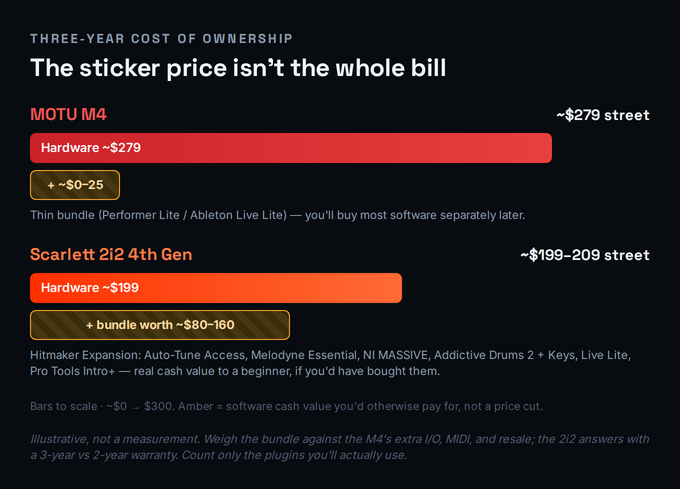
But this is exactly where honesty matters, because a bundle is only worth what you would have bought anyway. If you already own a DAW, a tuner and a few instruments, the Hitmaker bundle is close to worthless to you — duplicate licences you will never activate. If you are starting from a blank laptop, though, Auto-Tune Access, Melodyne Essential and MASSIVE alone represent real money you would otherwise spend, and getting them folded into a $199 purchase materially changes the value calculation. The trap is counting the full retail value of the bundle as if you would have bought every piece; the honest number is the value of the parts you will actually use, which for most beginners is a meaningful but not enormous chunk.
The bundled DAWs deserve a closer look, because they are not interchangeable. Ableton Live Lite, which both interfaces include, is the friendliest on-ramp for beat-driven and electronic music and the one most beginners actually keep. The Scarlett piles Pro Tools Intro+ and Cubase LE on top, which matter if you are aiming at a studio-standard workflow or scoring to picture, but both are deliberately limited versions designed to nudge you toward a paid upgrade. The honest read is that the DAW you stick with is usually decided by the music you make, not by which came free — so weigh the bundle for its instruments and effects, where the real, transferable value sits, rather than for the DAW count.
Weigh that against what the M4 gives you that never shows up as "free software": the extra I/O and MIDI we covered above, and resale value. MOTU's M-series holds its price well on the used market, while interface bundles are non-transferable — the licences are tied to the first registrant — so a used 2i2 sells without its bundle. Factor in warranty too: Focusrite covers the Scarlett for three years against MOTU's two, a small but real point back to the 2i2. None of this is measurable to the dollar, which is why the chart above is labelled illustrative; the point is to stop treating the sticker price as the whole story in either direction. If you are buying your very first setup and the bundle fills genuine gaps, the 2i2's effective cost is lower than it looks, which is why it leads bundle value 9.3 to 7.8 and edges overall value. Our best audio interfaces for beginners guide leans on exactly this logic.
Build, Latency, Drivers & Daily Use
Both interfaces are bus-powered over USB-C, both are built in metal and feel solid, and both are small enough to live in a backpack. On the desk, though, they present differently. The M4's headline is its full-colour LCD, which shows real input and output metering at a glance — a feature you rarely see at this price and one that genuinely speeds up setting levels, since you can see clipping coming instead of guessing from a single ring light. The 2i2 uses Focusrite's "gain halo" LEDs around the gain knobs, which are clear but coarser than a real meter. If you like to set levels by eye, the M4's screen is a daily pleasure.
Latency is excellent on both. The M4 quotes round-trip latency as low as roughly 2.5 ms under ideal settings, and Focusrite's 4th-Gen drivers are similarly quick; in real use, at sane buffer sizes, neither will give you a monitoring problem, and both offer direct hardware monitoring so you can track without hearing software delay at all. For tracking that means you can usually monitor through the interface latency-free and only worry about round-trip numbers when you are monitoring through plug-ins. If you want the background on why buffer size trades latency against CPU load, the latency entry covers it.
Two practical notes from the field. First, the 2i2 4th Gen does not have individual phantom-power switching — 48 V is global across both inputs — whereas the M4 lets you switch phantom power per input, which is handy if you ever run a condenser and a ribbon mic together. Second, on reliability: the Scarlett line has a long, boringly dependable track record, while the M4, for all its strengths, has drawn a thread of user reports about driver fussiness and unit-to-unit quality control. It is not an epidemic and most units are flawless, but if rock-solid plug-and-play with the least possible fiddling is your priority, the Scarlett's maturity is a quiet point in its favour. For how both stack up against the wider field in 2026, see our best audio interfaces of 2026.
Two more daily-use details round out the picture. Both interfaces drive headphones well for the price: the M4's two outputs are independently usable, while the 2i2's single output is loud and clean enough for tracking and casual mixing without being a dedicated headphone amp. And both are USB-C, bus-powered and class-compliant, so they run on current Mac and Windows machines without a power brick, travel light, and ask for nothing but the right cable — though it is worth confirming you have a USB-C-to-C or C-to-A cable that matches your computer's ports before launch day, a small thing that derails more first sessions than it should.
The Spec Table, Side by Side
The numbers, in one place. Where a row is a clear advantage it is worth re-reading the section above for the "so what," because several of these specs (loopback, the bundle, the I/O) mean more than the cell suggests.
A note on how to read it: a single-word cell hides a lot. "Loopback: hardware MIX knob" versus "software (Control 2)" looks like a tie until you map it to your workflow; "MIDI: yes" versus "no" is a non-issue for a USB-controller user and a deal-breaker for someone with a hardware synth; and "software bundle: thin versus large" swings from irrelevant to decisive depending on what you already own. Treat the table as an index into the sections above, not a scoreboard where the side with more checks wins. The right interface is the one whose handful of meaningful rows match what you will actually do — and for most people, only three or four rows here carry any real weight.
| Spec | MOTU M4 | Scarlett 2i2 4th Gen |
|---|---|---|
| Analog I/O | 4-in / 4-out | 2-in / 2-out |
| Mic preamps | 2 (0–60 dB) | 2 (69 dB gain) |
| Extra line inputs | 2 (ch 3/4) | None |
| Converters / DR | ESS Sabre32 / ~120 dB | RedNet-derived / 120 dB |
| Tone features | Transparent (clean) | Air (Presence + Drive) |
| Level helpers | Hardware monitoring | Auto Gain + Clip Safe |
| Loopback | Hardware MIX knob | Software (Control 2) |
| MIDI I/O | Yes | No |
| Metering | Full-colour LCD | Gain-halo LEDs |
| Monitor mix / RCA out | Yes / Yes | No / No |
| Headphone outs | 2 | 1 |
| Phantom power | Per input | Global (both) |
| Software bundle | Thin (Live Lite) | Large (Hitmaker) |
| Warranty | 2 years | 3 years |
| Street price (USD) | ~$279 | ~$199–209 |
Who Should Buy Which
Strip away the spec sheet and the decision comes down to a single honest question about your future, not your present. The Scarlett 2i2 4th Gen and the MOTU M4 are both excellent, both sound great, and both will serve you well — so do not agonise over fidelity, because that is not where they differ.
There is also a longevity argument the scorecard cannot capture. An interface is the one piece of a home studio you touch every single session, and the cost of replacing it is not just the resale loss but the disruption of re-learning a new box and re-wiring your desk. Buying slightly more interface than you need today — which in this matchup means the M4 — is often cheaper across three years than buying exactly enough and replacing it in eighteen months. The counter-argument is equally fair: money sunk into unused inputs is money not spent on a better microphone or some acoustic treatment, either of which would improve your recordings more than an interface upgrade ever will. Both are true; which applies depends entirely on whether you will grow into the extra I/O.
If you are still genuinely torn, default to the question of regret. The most common regret in this price bracket is buying a 2-channel interface and outgrowing it within a year, so if there is any real chance you will add hardware, the M4 is the safer long bet even at the higher price. The opposite regret — buying I/O you never use — is cheaper and quieter. And if neither of these is clicking, it may be that your needs point elsewhere entirely; our 2026 interface roundup covers the alternatives, from the Audient EVO 4 to the SSL 2, that compete with both of these for specific use cases.
Practical Exercises
Three short exercises to turn this comparison into a confident decision rather than a guess. Do them before you buy — they take twenty minutes and they are the difference between the right purchase and an expensive return.
- Write down every sound source you currently record: each mic, guitar, keyboard or other input.
- Now write down every source you can realistically imagine adding in the next year — a synth, a second mic, a drum machine, a turntable.
- Count the total. If it is one or two, the 2i2 is enough. If you reach three or four, the M4's extra inputs are about to earn their price.
- Check whether any of those future sources is a hardware MIDI device without USB. If so, the 2i2's lack of MIDI is a real problem and the M4 (or a Scarlett 4i4) is the answer.
- List the software you already own: your DAW, any tuner, any virtual instruments.
- Go through the Scarlett Hitmaker bundle item by item (Auto-Tune Access, Melodyne Essential, MASSIVE, Addictive Drums, the included DAWs) and cross off anything you already have or would never use.
- Add up the realistic retail value of what is left — the parts you would genuinely have bought. That number, not the full bundle value, is the discount the 2i2 is really offering you.
- Subtract it from the 2i2's price and compare that effective figure to the M4's price plus whatever software you would need to buy separately.
- Decide whether you will ever stream, podcast, or capture computer audio. If never, skip this — loopback is not your deciding factor.
- If you will, sketch the sources you need to blend: just a mic and your voice, or a mic plus game audio, music and a guest's call.
- If you are blending several live sources and want to ride that balance in real time, that is the M4's hardware MIX knob workflow. If you mostly need to capture system audio after the fact, the Scarlett's software loopback covers it.
- Match the interface to the workflow you actually drew, not the one you imagine you might one day have.