If you searched “is Studio One dead” and landed here in a small panic, breathe: it isn’t. In January 2026, at NAMM, Fender rebranded PreSonus Studio One Pro as Fender Studio Pro 8. The name “Studio One” was retired for the DAW; the software underneath was not. It is the same application, built on the same code lineage that PreSonus shipped back in 2009, carried forward intact and then extended. Your old projects still open. Your muscle memory still works. What changed is the badge on the splash screen, the interface around the edges, and a set of genuinely new features bolted onto a mature core.
That gap — between what the rebrand looks like and what it actually is — is the entire reason this review exists. The announcement coverage from January is already going stale, the vendor pages sell you the upside, and the comment sections are equal parts grief and conspiracy. None of that answers the only two questions a real user has: should I pay the upgrade, and how does this thing stack up against the DAWs I’d otherwise be buying in 2026? We’re going to answer both, decision-first.
How we approached this. Every price, version number, and feature claim below was re-verified this session against Fender’s own product pages and a spread of recent hands-on reviews — not the January news cycle, which already contains stale figures and at least one currency mix-up on the annual subscription. Where a number is regional or still moving, we say so rather than print a tidy lie. If you’re newer to the category and want the foundation first, our explainer on what a DAW actually is will make the rest of this land harder.
Studio One didn’t get killed — it got renamed and upgraded. Fender Studio Pro 8 is the same mature DAW with a modernised interface, native Fender Mustang and Rumble amp/effects plugins (57 amp models, 100-plus effects), AI audio-to-MIDI, and, as of the 8.1 update in June 2026, an in-app Studio Assistant, Moises integration and a native vocal-tuning plugin. The upgrade from any prior Studio One perpetual licence is $99.99; a full new perpetual licence is $199.99; Pro+ subscriptions run $19.99/month. If you already own Studio One, the upgrade is a low-risk yes, especially if you touch guitar. If you’re a new buyer, it earns a serious place on your shortlist next to Logic, Ableton and Cubase — with one honest caveat: the new identity leans guitar-forward, and pure electronic or vocal producers gain the least from the headline additions.
The Verdict
A mature, deep, genuinely excellent DAW that survived its rebrand intact and came out stronger for guitarists — held back from a higher score only by real questions about long-term ecosystem stability and a new identity that serves non-guitarists less than it serves everyone else.
| Core DAW power & workflow | 9.0 | |
| Guitar & amp tooling | 8.8 | |
| AI & songwriting features | 8.0 | |
| Value (perpetual + upgrade) | 8.6 | |
| Cross-platform & integration | 8.2 | |
| Stability & ecosystem confidence | 7.6 | |
| Fit for non-guitarists | 7.4 |
That 8.4 is a defended judgement, not an average, and the spread is the argument. Core DAW power and workflow (9.0) is where the product earns its keep: this is Studio One’s mature recording, comping, editing, mixing and integrated-mastering engine, and it remains one of the most coherent end-to-end workflows in any DAW. Guitar and amp tooling (8.8) is the headline gain — native Mustang and Rumble modelling that turns the DAW into a credible amp-sim rig out of the box. Value (8.6) reflects the perpetual licence and the gentle $99.99 upgrade in a market drifting toward rent-forever subscriptions. AI and songwriting (8.0) and cross-platform/integration (8.2) are real strengths, the latter newly buoyed by a Linux public beta. Then the two numbers that cap the score: stability and ecosystem confidence (7.6), because a rebrand mid-life raises a fair question about commitment, and fit for non-guitarists (7.4) — the honest amber outlier — because if you make purely electronic or vocal music, the new guitar-forward identity simply isn’t aimed at you, even though you lose nothing. Every one of those numbers is defended in the sections below.
It’s worth being explicit about what an 8.4 means here, because review scores have inflated to the point of meaninglessness across most of the web. We reserve nines and tens for tools that are either category-defining or essentially without compromise, and Fender Studio Pro 8 is neither — it’s a superb DAW carrying two honest asterisks. An 8.4 in our scale is a confident recommendation with eyes open: buy it, you’ll be glad you did, and here are the two things you should know going in. The product would score higher if the rebrand were a few years settled and if its flagship investment served every kind of producer equally. Neither is true today, and a score that pretended otherwise would be doing you a disservice. The number is high because the software is genuinely excellent; it’s capped because reviewing honestly means pricing in the parts that aren’t resolved yet.
What Actually Happened to Studio One
Here is the sequence, because the SERP is full of people who only caught one frame of it. PreSonus shipped Studio One 1.0 in 2009 and spent the next fifteen years building it into one of the most respected DAWs in the field — the drag-and-drop browser, the single-window Song and Project pages, the chord track, the integrated mastering. In November 2021, Fender quietly acquired PreSonus. For four years almost nothing visible changed; PreSonus kept shipping Studio One under its own name. Then, at NAMM in January 2026, Fender consolidated the brand: Studio One Pro became Fender Studio Pro 8, the Quantum interfaces became Fender Quantum, the AudioBox line became Fender AudioBox, and the MyPreSonus account portal became MyFender. In June 2026 the company shipped the 8.1 update, proving the rebrand was a beginning rather than a tombstone.
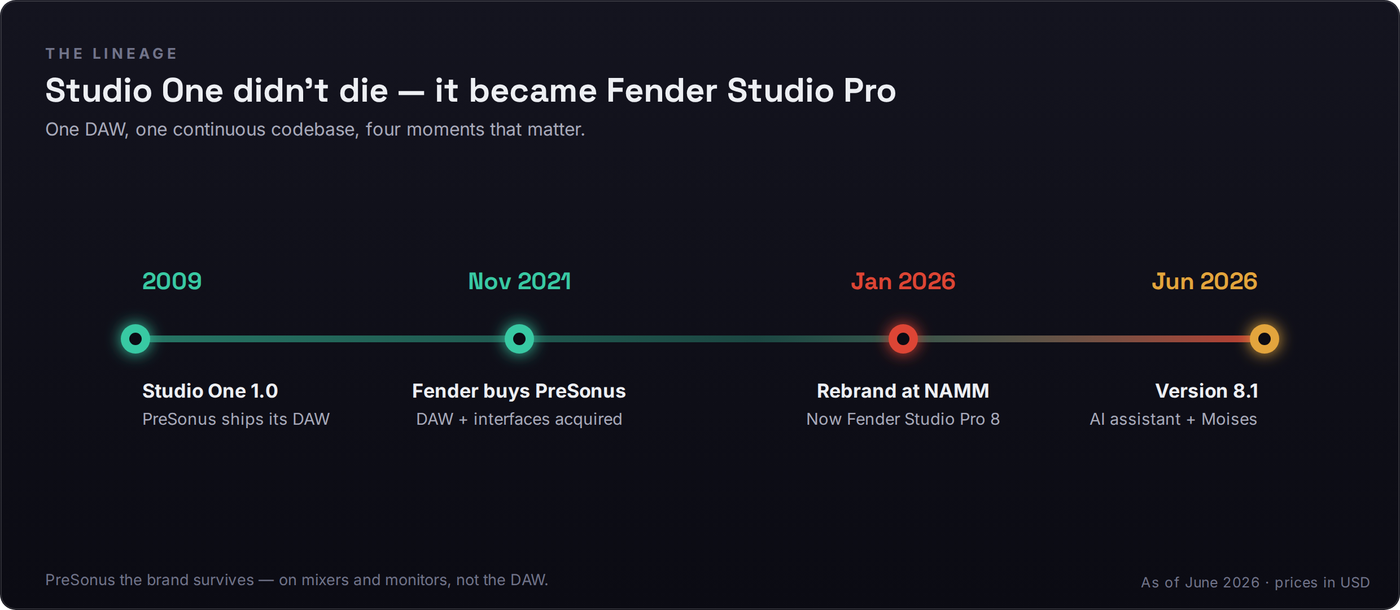
The crucial detail most coverage buries: the PreSonus name didn’t vanish. It survives on hardware — the StudioLive mixers, the Eris monitors, the PA gear — while the software and the audio interfaces moved under Fender. So “PreSonus is gone” is wrong on two counts. The company is now a pro-audio division of Fender, the brand persists where it has equity, and the DAW you may have spent years learning is alive, actively developed, and on a faster release cadence than it was before. If your relationship with the software predates all this, our older PreSonus Studio One 7 review still documents the version you likely own — this page is the current chapter of the same story.
The four-year gap between the 2021 acquisition and the 2026 rebrand is the part worth dwelling on, because it’s reassuring rather than ominous. Fender didn’t buy PreSonus and immediately strip the badge off everything; it spent years operating the business, learning the software, and integrating the hardware before it touched the brand. Companies that acquire to asset-strip move fast and cut deep. Companies that acquire to build move slowly and protect what they bought. The long quiet period, followed by a major version and a point-release in quick succession, reads far more like the second pattern than the first. That doesn’t make the future certain — nothing does — but it means the decision was deliberate and the integration was patient, which is exactly what you’d want from the steward of a DAW you depend on.
Why did Fender do it at all? The strategic read is straightforward. Fender sells guitars and amps to millions of players, many of whom record at home and bounce off the friction of a generic DAW. Owning a mature DAW and welding world-class amp modelling into it lets Fender sell a complete “plug in your Strat and record” pipeline under one trusted name. That’s the upside for guitarists, and it’s genuine. The cost — which we’ll treat honestly later — is that fifteen years of “Studio One” tutorials, forum threads and search equity now point at a retired name, and some long-time users who don’t play guitar feel the product’s centre of gravity shifted away from them.
First, Untangle the Two “Fender Studio” Products
Before you spend a dollar, resolve the single most common confusion around this launch, because Fender’s own naming invites it. There are two different things wearing the Fender Studio name, and they are not the same product.
The first is Fender Studio — a free, deliberately simple companion app (now at version 1.2) that runs on phone, tablet and desktop. It’s built for fast capture: plug in, lay down an idea, stack a few tracks, add an amp tone, and get out. It costs nothing and it is genuinely good at being a sketchpad. The second is Fender Studio Pro 8 — the paid, professional DAW that is the subject of this review, the full Studio One lineage with unlimited tracks, deep editing, mixing, mastering and the complete plugin suite. The free app can hand a session off to Studio Pro while preserving your tracks, effects and amp models, which is a lovely on-ramp — but it is an on-ramp, not the destination.
The practical takeaway: if a review or a forum post raves that “Fender Studio is free,” check which product they mean before you get excited or outraged. The free app being free tells you nothing about whether the $199.99 Pro DAW is worth it. Conflating the two is how people end up disappointed that the free tool doesn’t do what the paid tool does, or suspicious that the paid tool is charging for something that’s “supposed to be free.” Neither reaction survives five minutes of using both.
What’s Genuinely New in 8 and 8.1
A rebrand that only changed the logo would deserve a shrug. This one changed more, and the additions cluster into four areas. None of them removed anything from Studio One’s core — multiple reviews confirm the transition was additive — so everything below sits on top of the workflow you already knew.
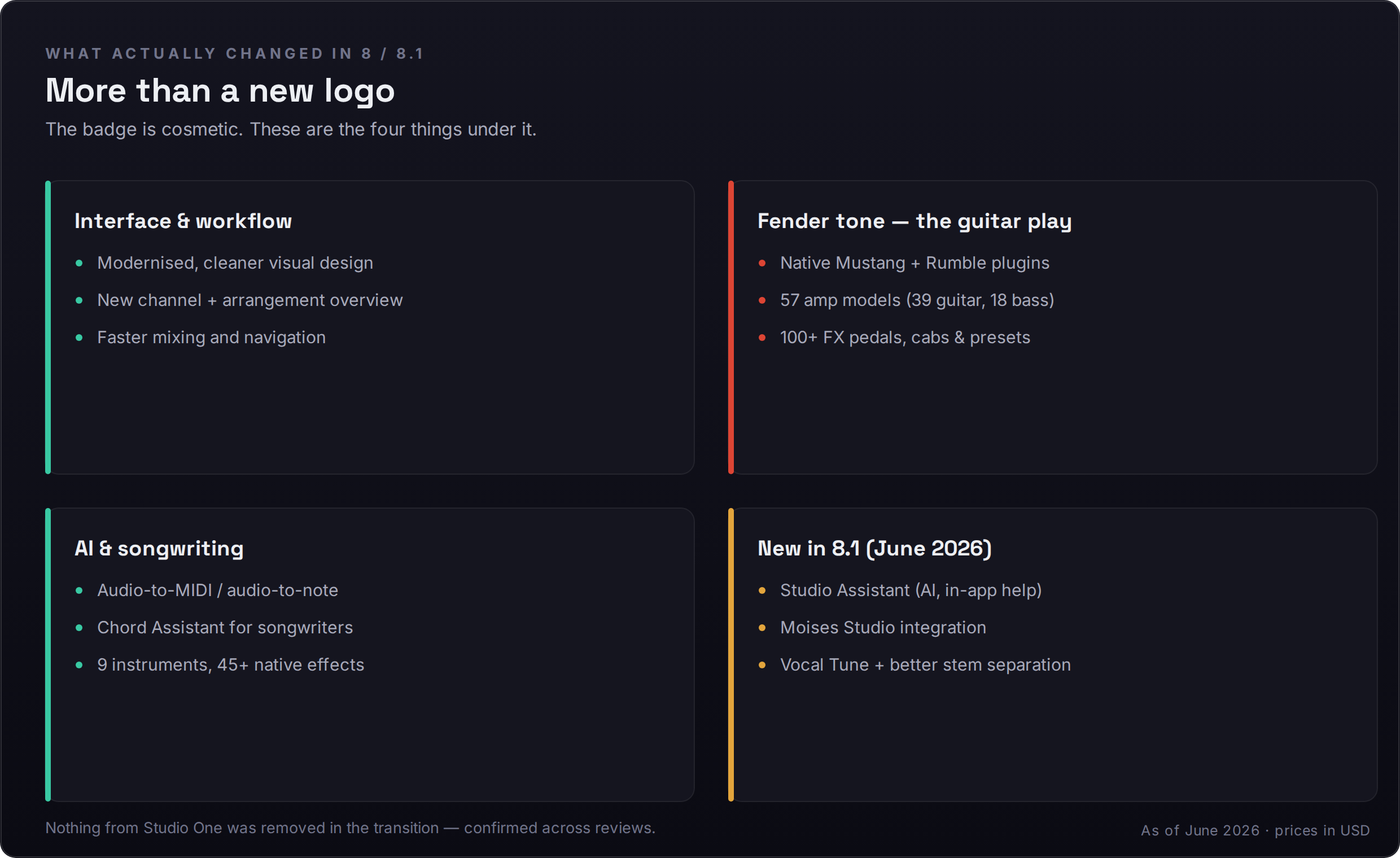
Interface and workflow. The most immediately visible change is a modernised, cleaner UI and a new channel/arrangement overview that makes navigating a large session faster. This is the kind of improvement you stop noticing after a week precisely because it works — less squinting, fewer clicks to the thing you want. It doesn’t reinvent the single-window philosophy Studio One was known for; it sharpens it.
The guitar play: Mustang and Rumble. This is the marquee addition and the clearest expression of why Fender bought in. Native Fender Mustang (guitar) and Rumble (bass) plugins ship inside the DAW with roughly 57 amp models — about 39 guitar and 18 bass — plus well over 100 effect pedals, cabinets and presets. For a guitarist this is transformative: you no longer bolt a third-party amp sim onto a generic DAW, you open the box and your tone is already there, modelled by the company that builds the actual amplifiers. It’s the feature that, more than any other, justifies the new identity.
The honest question a guitarist will ask is how this modelling compares to the dedicated amp-sim plugins they might already own — the established names that have spent a decade refining their tone. The fair answer is that the built-in Mustang and Rumble suite is excellent and, for the overwhelming majority of players, more than enough, while the very top specialist plugins may still edge it on the most scrutinised high-gain and boutique tones. But that framing slightly misses the point. The value here isn’t that Fender out-models every specialist; it’s that a credible, broad, well-voiced amp rig is sitting inside your DAW with zero setup, made by the company that designs the physical amplifiers. For a player who just wants to plug in and sound good, that integration is worth more than the last two percent of tone a separate purchase might buy. The convenience is the feature.
AI and songwriting. Version 8 added AI audio-to-note and audio-to-MIDI conversion — hum or play a part and get editable MIDI back — alongside a Chord Assistant aimed at songwriters who want harmonic suggestions without a music-theory degree. These sit beside the nine virtual instruments, 45-plus native effects and the 200GB-plus of samples and loops that come with the full package. They’re not gimmicks; audio-to-MIDI in particular is the kind of feature you reach for constantly once it’s there.
A word of realism on the AI tools, because the marketing rarely supplies it. Audio-to-MIDI conversion is genuinely useful and genuinely imperfect: on a clean, monophonic line — a bassline, a sung melody, a single-note lead — it’s reliable enough to save real time, and on dense polyphonic or percussive material it will need correcting. The right mental model is “a fast first draft you edit,” not “a perfect transcription you accept.” The same applies to the Chord Assistant and the 8.1 Studio Assistant: they’re accelerators for someone who already knows roughly what they want, not replacements for knowing it. Held to that standard, they earn their place in the workflow. Sold as magic, they’d disappoint — which is precisely why we score the AI axis an honest 8.0 rather than the inflated nine the feature list might tempt.
The 8.1 update (June 2026). The .1 is where Fender signalled seriousness. It added a Studio Assistant — an in-app AI helper, in public beta for Pro+ users — plus Moises Studio integration, a native Vocal Tune pitch-correction plugin, improved stem separation, pitch curves, and Dolby Atmos headphone personalisation. Shipping a substantive feature update within months of the rebrand is the strongest available evidence that this is an actively-invested product, not a parked asset. When we get to the Cakewalk fear, hold that fact.
“Will Fender Kill It Like Gibson Killed Cakewalk?”
This is the fear under every nervous comment thread, and it deserves a straight answer rather than reassurance. The precedent people invoke is real: Gibson acquired Cakewalk — the company behind SONAR — in 2013, shut the operation down in 2017, and filed for bankruptcy in 2018. A guitar giant bought a DAW and then let it die. If you lived through that, watching another guitar giant buy your DAW is going to set off alarms. The worry is legitimate and you shouldn’t let anyone wave it away.
But the situations differ in ways that matter. Gibson in the mid-2010s was financially distressed and over-extended, shedding assets it didn’t understand on the way to bankruptcy; SONAR was collateral damage in a company-wide collapse. Fender, by contrast, has spent years deliberately building a pro-audio division — it bought PreSonus in 2021, integrated the hardware, and then shipped a full major version and a meaningful 8.1 update inside the first half of 2026. That is the behaviour of a company investing in a product, not winding one down. The trajectory is the opposite of Cakewalk’s.
No software future is guaranteed, and honest reviewing means saying so. What you can do is insulate yourself from the risk: buy the perpetual licence rather than subscribing. A perpetual licence means you keep the version you paid for forever, regardless of what happens to the company — the same protection you’d want from any DAW maker. Subscriptions evaporate if the service does; a perpetual install on your drive does not. That single choice converts “what if they abandon it” from an existential worry into a manageable one. We weighted the stability axis at 7.6 precisely because the question is fair — not because the evidence points at abandonment, but because a mid-life rebrand earns a few points of caution until more time passes.
The Honest Grumble: SEO Loss and the Non-Guitarist
Two real criticisms have surfaced repeatedly in reviews and comment sections, and reporting them straight is part of the job. The first is structural: retiring the “Studio One” name cuts roughly seventeen years of tutorials, forum threads, YouTube walkthroughs and search equity loose from the product. A beginner Googling “Studio One how to” in 2027 will find a mountain of content for a name the software no longer uses, and a thinner, newer layer for “Fender Studio Pro.” That learning-resource gap is temporary but real, and it’s a genuine friction for new users right now. It also lumps the product into an already crowded “Studio Pro” naming space, which doesn’t help discoverability.
The second criticism is about identity. The new branding is unmistakably guitar-forward — Mustang, Rumble, the whole Fender mythology — and some long-time users who make electronic, hip-hop, orchestral or purely vocal music feel the product’s centre of gravity has moved away from them. One widely-read review captured it as a worry that the “rest of us may feel under-served.” It’s worth being precise about what this does and doesn’t mean. It does not mean anything was taken away: the editing, mixing, mastering, MIDI and instrument tooling that made Studio One a great all-round DAW for non-guitarists is all still there. It does mean the headline investment — the marketing energy, the flagship feature — is pointed at players, and if you’re not one, the upgrade’s shiniest selling point isn’t for you. That’s exactly why “fit for non-guitarists” is the one amber number on the scorecard. You lose nothing; you just gain less.
There’s a deeper version of the identity worry worth naming, because it’s the real anxiety under the surface complaints. Is having a guitar company own your DAW a feature or a liability? The optimistic read is that Fender brings focus, capital and a clear customer it understands, and that a DAW with a deep-pocketed owner committed to a specific audience is more stable than one drifting without a thesis. The pessimistic read is that a guitar-first owner will keep steering the product toward players and let the general-purpose strengths stagnate. Both are plausible, and a year of releases isn’t enough to settle which is right. What you can say honestly today is that the first two releases added across the board — AI tools, vocal tuning, score features, Linux support — rather than narrowing to guitarists only. The direction so far is broadening, not narrowing. Watch the next two releases to see whether that holds.
The Pricing, and the Upgrade Math
Here’s where the decision gets concrete. A full new perpetual licence for Fender Studio Pro 8 is $199.99. The upgrade from any prior Studio One perpetual licence — Professional, Producer or the legacy Artist editions, not just version 7 — is $99.99 (roughly £89.99 / €99.99). If you’d rather subscribe, Pro+ runs $19.99 per month, and the annual plan is around $179.99 per year — notable because the annual Pro+ reportedly bundles a perpetual licence plus twelve months of updates, which blurs the usual rent-versus-own line in the buyer’s favour. A perpetual purchase includes one year of updates; after that you keep the version you own and pay only if you want the next major release. Free tiers such as the old Studio One Prime do not qualify for the upgrade price.
Read those numbers against the market and the value case sharpens. Most of the DAW world is drifting toward subscriptions or charging $300–$600 for a flagship perpetual licence. Fender Studio Pro 8 hands an existing user a genuinely improved DAW for $99.99 and a new buyer a full professional environment for $199.99, perpetual, with a year of updates and a deep stock-content library included. That is aggressive pricing for what you get, and it’s the single strongest argument for the upgrade if you already own any Studio One licence. One caveat worth flagging: pricing and the “current version” line are dated facts that can move — re-check Fender’s store before you buy, especially if you’re reading this well after publication.
Run the perpetual-versus-subscription math over a realistic horizon and the choice usually resolves cleanly. At $19.99 a month, Pro+ costs roughly $240 a year; even the discounted annual plan around $179.99 reaches the price of a full perpetual licence inside about thirteen months. Over three years, subscribing runs several hundred dollars more than buying once — unless you genuinely value always being on the latest version and the bundled extras enough to pay the premium. The perpetual licence is the better default for most independent producers: you pay once, you own the version, and you upgrade only when a future release actually tempts you. Subscription makes sense if you’re a studio that needs the newest features the day they ship, or if spreading the cost monthly matters more than the total. For everyone else, “buy the perpetual, skip the subscription” is both the cheaper and the safer call — safer because, as noted, a perpetual install survives whatever happens to the company.
How It Stacks Up: The 2026 Cross-Shop
If you’re a new buyer rather than an upgrader, the real question isn’t “is it good” — it is — but “is it the right one for me versus the DAWs I’d otherwise buy.” A Studio One user genuinely cross-shops against Ableton Live, Logic Pro, Cubase and Reaper, with “just stay on Studio One 7” as a real fifth option. Here’s the honest grid; every price was verified live this session.
| DAW | Price model | Best-fit user | Amp / guitar tooling | Score↔DAW integration | Learning curve |
|---|---|---|---|---|---|
| Fender Studio Pro 8 | $199.99 perpetual / $99.99 upgrade / $19.99-mo | Guitarists & all-round producers who want one coherent workflow | Native Mustang/Rumble, 57 amp models — class-leading out of the box | Strong (inherited Notion lineage, tightening in 8.1) | Moderate — gentle for a deep DAW |
| Ableton Live 12 | $99 Intro / $449 Standard / $749 Suite | Electronic producers & live performers | None native (third-party amp sims) | Weak (not its focus) | Moderate; Session view is its own paradigm |
| Logic Pro | $199.99 one-time, Mac-only | Mac owners wanting depth at a flat price | Good (Amp Designer, Pedalboard) | Good (notation built in) | Moderate; huge feature surface |
| Cubase Pro 14 | ~$579 (Artist ~$329) | Composers & scoring/orchestral work | Decent (VST Amp Rack) | Excellent (deep score editor) | Steep |
| Reaper 7 | $60 personal / $225 commercial | Budget-conscious & tinkerers who customise everything | None native (bring your own) | Weak (no real notation) | Steep; infinitely configurable |
| Stay on Studio One 7 | $0 (you own it) | Happy current users with no guitar/AI itch | Whatever you already added | Same mature core, pre-8.1 | None — you already know it |
The grid makes the lanes obvious. If your music lives or dies on guitar tone, Fender Studio Pro 8 is the only one here with class-leading amp modelling built in — nobody else is close out of the box, and our Studio One vs Ableton comparison and Studio One vs Logic Pro comparison both pre-date the rebrand but still map the core-workflow trade-offs accurately. If you make club-focused electronic music or perform live, Ableton Live 12 remains the paradigm to beat, and our broader Ableton Live review covers why. Mac owners chasing flat-price depth should weigh Logic Pro seriously. Composers doing orchestral or to-picture work will find Cubase’s score editor still sets the bar, though Fender is tightening the gap via the Notion lineage. And if you live on a budget or love to customise, Reaper 7 does more for $60 than anything has a right to. For the full field with no single product in the centre, our best DAW for beginners guide ranks the on-ramps, and Mac users specifically should see our best DAW for Mac roundup.
Two more cross-references worth your time. If you came to Studio One from a loop-and-pattern background, our FL Studio review and the updated FL Studio 2026 guide explain where that workflow still wins and where Studio Pro’s linear-plus-pattern hybrid pulls ahead. And whatever DAW you land on, the mastering stage is where mixes get won or lost — run a near-final bounce through our free Mix Fingerprint analyzer to see where your loudness and tonal balance actually sit against a target before you commit.
One factor the grid can’t show but that should weigh heavily: switching cost. If you’re already a Studio One user, the honest truth is that the gravity of staying is enormous and usually correct. Every hour you’ve invested in learning the workflow, every template and key command in your fingers, every project in the native format — all of that transfers intact to Studio Pro 8 and none of it transfers to a competitor. A rival DAW would need to be dramatically better at your specific work to justify relearning everything from scratch, and for most people it simply isn’t. The cross-shop table matters most for genuinely new buyers and for the rare user whose needs have outgrown what the lineage does well. If you’re an existing user idly wondering whether the grass is greener, the rebrand is not the moment to jump ship — it’s the moment to upgrade the ship you already know.
Should You Upgrade? The Honest Decision
Strip away the drama and the choice comes down to what you already own and what you actually make. The decision tree below is the whole review compressed into one path; the prose after it defends each branch.
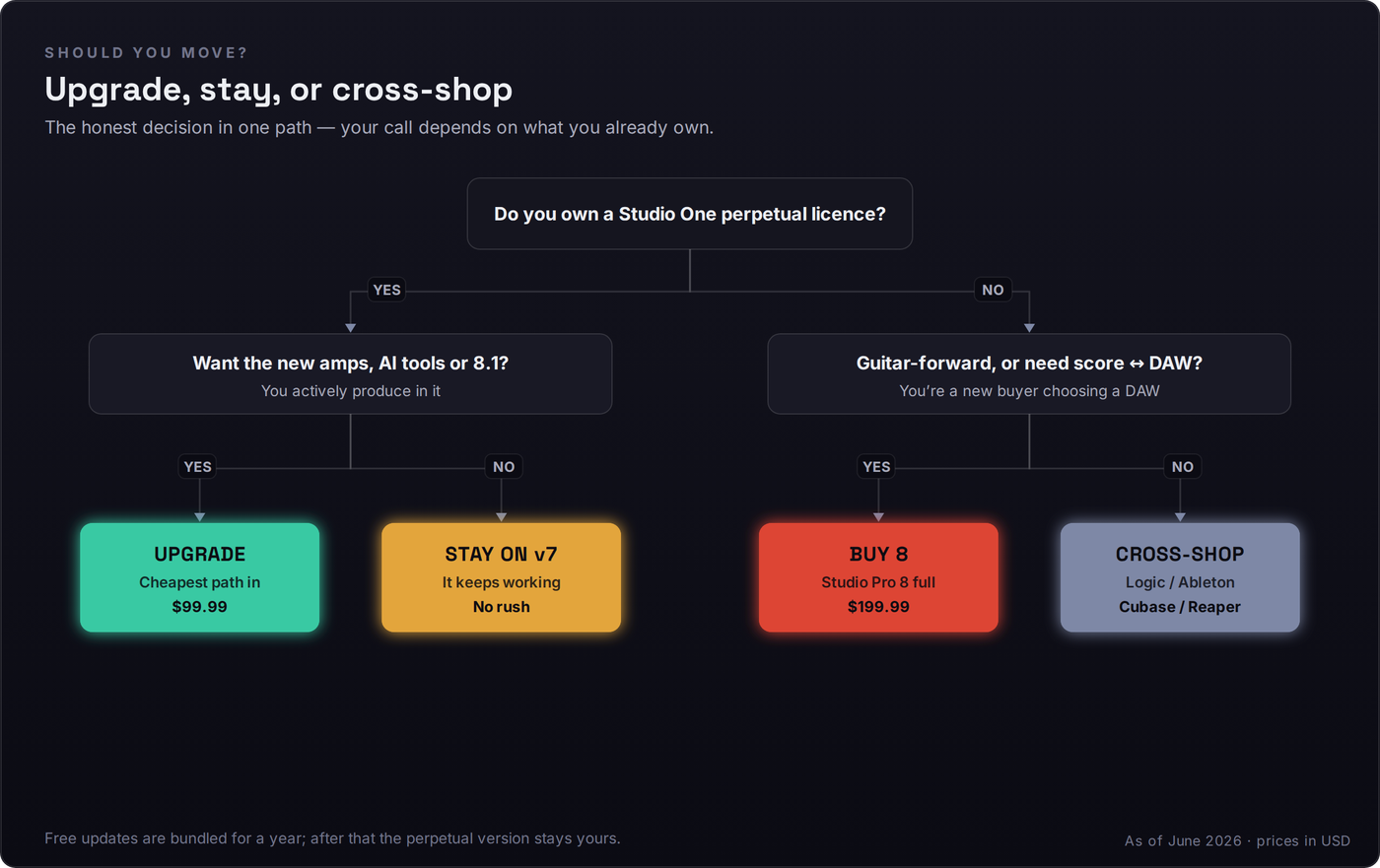
If you own a Studio One perpetual licence and you actively produce in it: the $99.99 upgrade is an easy yes, and an easier one if you play guitar or bass. You get the modernised interface, the Mustang/Rumble suite, audio-to-MIDI, and the 8.1 assistant and Vocal Tune tools, all on top of the workflow you already know, with your existing projects opening unchanged. The risk is minimal because the licence is perpetual — worst case, you own a better version of a DAW you already trusted. There is no scenario where the upgrade leaves you worse off than v7.
If you own a licence but you’re happy and don’t need the new toys: there’s genuinely no rush. Studio One 7 keeps working; it didn’t stop functioning when the name changed. Wait for a sale, wait for 8.2, or wait until a specific 8.x feature becomes something you actually want. “Stay” is a legitimate, cost-free answer, and any review that tells you a rebrand obligates you to pay is selling something.
If you’re a new buyer who plays guitar or needs a tight score-to-arrange workflow: the full $199.99 perpetual licence is one of the strongest value propositions on the 2026 board — a deep, mature DAW with the best built-in amp modelling in the category and a real composition pipeline, bought outright rather than rented. If you’re a new buyer who makes purely electronic or vocal music: still shortlist it, but cross-shop honestly against Ableton, Logic and Cubase using the grid above, because for your specific work the headline guitar features are the part you’ll use least.
Try It Yourself: Three Hands-On Tests
The fastest way to know whether a DAW is for you is to make it do the thing you’d actually do in it. Three escalating tests, each designed to surface a real decision rather than a feature checkbox.
- Start a new song, create an audio track, and arm it for a guitar or bass DI — or just import a clean DI clip you already have. Insert the native Mustang (or Rumble) plugin and audition three contrasting amp models against the same part.
- Switch one model’s cabinet and stack a pedal or two from the bundled effects. Notice how little setup stood between “empty session” and “usable tone” compared with bolting on a third-party amp sim.
- Decide honestly: did having the amp suite built in change how quickly you got to a sound you’d keep? That single answer tells you most of what the guitar-forward identity is worth to you.
- Record yourself humming or playing a simple bass figure onto an audio track. Run the AI audio-to-MIDI conversion on it to get editable note data, then route that MIDI to one of the bundled virtual instruments.
- Clean up the converted MIDI — fix a stray note, quantise lightly, adjust velocities — and judge how much editing the conversion actually needed versus how much it saved.
- Ask the real question: did audio-to-MIDI get you from idea to a playable part faster than programming it by hand would have? That’s the AI feature’s value, measured on your own workflow instead of a spec sheet.
- Take a MIDI part and move it into the notation/score view, then make an edit in notation — change a rhythm, add an articulation — and send it back to the arrangement. Confirm the round-trip preserved your intent in both directions.
- Render a finished section and run it through a loudness meter; note integrated LUFS and true peak against a −14 LUFS streaming target so you know exactly what mastering it still needs.
- Write the one-line verdict for your situation: does the score↔arrange round-trip and the integrated mastering chain cover your composition-to-master pipeline, or do you still reach for a dedicated notation app? If it covers you, that’s the Cubase-competitor claim proven on your own project.